GitHub Copilot review 2026 — the short version: it’s easy to dismiss as autocomplete with a better marketing budget, and the reviews suggest that’s the wrong way to think about it.
Here’s an actual screenshot, not a stock photo — this is GitHub Copilot writing real code on a free-plan account we set up to check it:
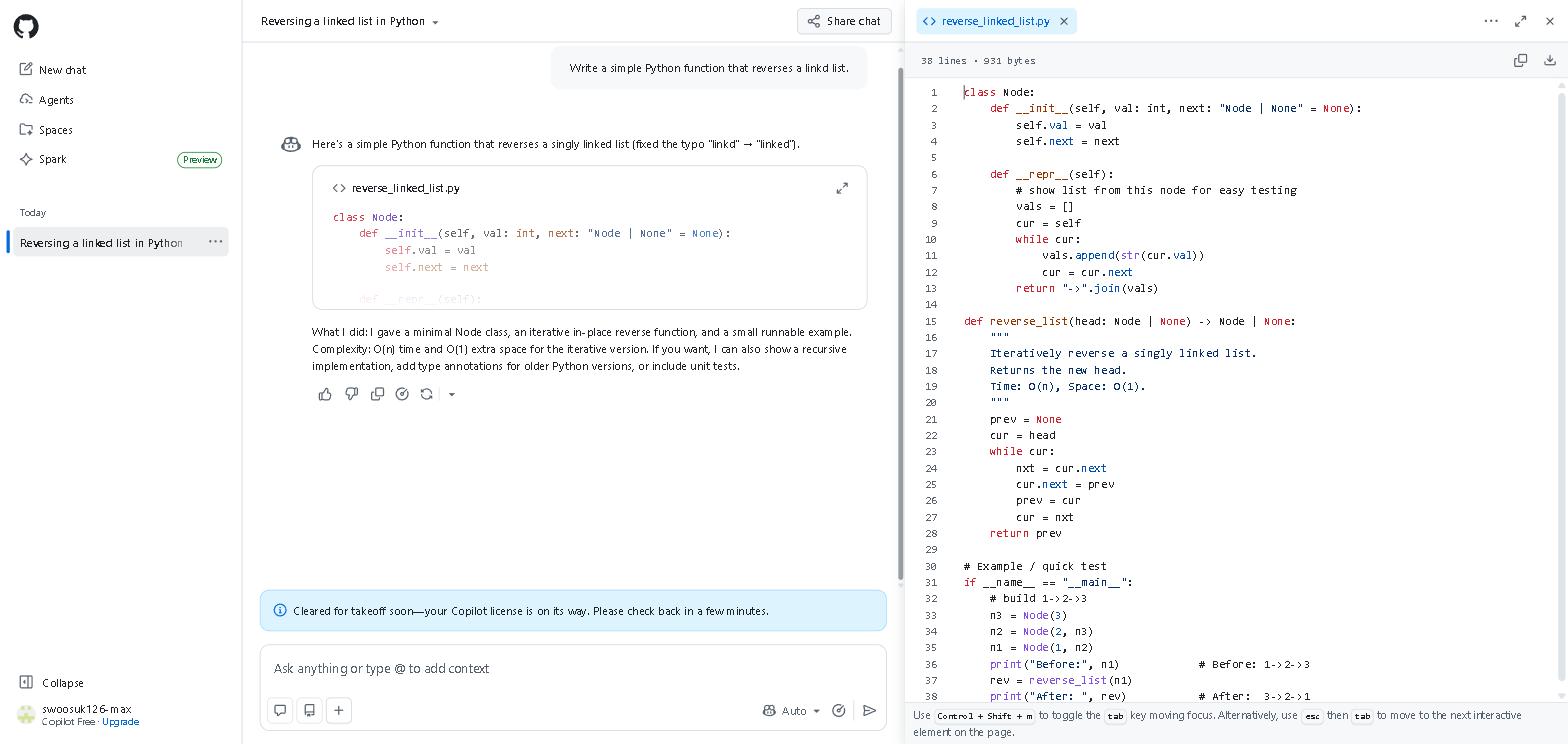
A note on how this review was written: we come at this as ChatGPT users — automation scripts, workflow tools and integration work, with a chat window open alongside the editor — and we’ve checked Copilot on its free plan (the screenshot above) rather than used it as a daily tool. The rest is based on GitHub’s documentation, its controlled study and verified user reviews. The difference Copilot introduces, and the one every review circles back to, is an AI that watches your code in real time rather than responding to what you describe in a chat window. That is a different kind of tool, not a better chatbot.
The moment reviewers describe again and again is the same one: Copilot generating exactly the function they were building, before they had typed more than the signature and a comment explaining what it should do. That is the experience that explains why developers who adopt it tend to keep it.
In GitHub’s own controlled study, developers using Copilot finished a given coding task 55% faster than those without it — 1 hour 11 minutes against 2 hours 41 minutes — and more of them finished at all, 78% versus 70%.
If you only care about the short answer: install the free plan and use it for one real project. The time savings will make the decision for you.
Should You Use GitHub Copilot?
- Do you write code daily as part of your job or studies? → Yes, Copilot is built for this
- Do you work with legacy codebases or unfamiliar code? → Yes, Copilot Chat explains any code in plain English in seconds
- Are you learning to code for the first time? → Start with Replit AI first — check our Best AI Coding Tools in 2026 guide
- Do you work with sensitive codebases in a regulated industry? → Check your organization’s policy — consider Tabnine for privacy-first needs
- Are you already using Cursor? → See our comparison section below
Quick Summary
| Feature | Rating |
|---|---|
| Code Suggestions | ⭐⭐⭐⭐⭐ (5/5) |
| Copilot Chat | ⭐⭐⭐⭐⭐ (5/5) |
| Editor Integration | ⭐⭐⭐⭐⭐ (5/5) |
| Language Support | ⭐⭐⭐⭐⭐ (5/5) |
| Free Plan Value | ⭐⭐⭐⭐ (4/5) |
| Overall | ⭐⭐⭐⭐½ (4.5/5) |
Verdict: GitHub Copilot is the best AI coding tool for everyday development in 2026. Its seamless editor integration, real-time suggestions, and Copilot Chat make it the most practical starting point for any developer — and the free plan is enough to experience its full value.
What Is GitHub Copilot?
GitHub Copilot is an AI coding assistant developed by GitHub (owned by Microsoft) in partnership with OpenAI. It integrates directly into your existing code editor — VS Code, JetBrains, Neovim, and others — providing real-time code suggestions, autocomplete, and an AI chat interface for coding questions.
Unlike standalone AI tools like ChatGPT or Claude, Copilot works inside your editor as you code — seeing your file, your project context, and your cursor position in real time. This deep integration is what makes it qualitatively different from pasting code into a chatbot.
Key Features
Real-Time Code Suggestions
Copilot’s core feature is its real-time autocomplete — suggesting entire lines, functions, and blocks of code as you type. It uses the context of your current file and project to generate suggestions that match your coding style, naming conventions, and patterns.
Copilot Chat
Copilot Chat is a conversational AI interface built directly into your editor. You can ask coding questions in plain English, explain errors, request refactoring suggestions, and get explanations of unfamiliar code — all without leaving your development environment.
Multi-File Context Awareness
Copilot can reference multiple files in your project to generate contextually appropriate suggestions — understanding how different parts of your codebase relate to each other.
Inline Chat
Copilot’s inline chat feature allows you to highlight a block of code and ask a specific question or request a specific change — getting targeted assistance exactly where you need it without switching to a separate chat window.
Code Review
GitHub Copilot now includes automated code review features — flagging potential issues, suggesting improvements, and identifying bugs before they reach production.
Supports Every Major Language
Copilot works across Python, JavaScript, TypeScript, Ruby, Go, Java, C#, C++, and virtually every other programming language in common use — with particularly strong performance in Python and JavaScript.
My Take: What GitHub Copilot Does Well
The time savings concentrate in repetitive structure, not complex logic. That’s the consistent finding in user reviews: unit tests, boilerplate and similar functions across a codebase are where Copilot does most of the typing, often generating the next test case before the function name is finished. Reviewers who plan repetitive coding work around it report the biggest gains.
Copilot Chat is the most underrated feature. For anyone who regularly deals with unfamiliar code — legacy systems, third-party integrations, undocumented scripts — being able to highlight a block and ask “what does this do and why?” in plain English, directly in the editor, is what reviewers most often say changed how they approach an unfamiliar codebase. The answers are grounded in the surrounding code in a way a generic chatbot answer isn’t.
The editor integration lowers the bar for asking. With ChatGPT, getting help means switching context — copy the code, open a tab, paste, ask, copy the answer back — and that friction means smaller questions often go unasked. Having the assistant inside VS Code removes that step, which is the practical reason reviewers say they use Copilot more than they expected to.
My Take: Where GitHub Copilot Falls Short
It’s not the right tool for complex, multi-file architectural work. For the kind of project-level thinking that requires understanding how an entire codebase fits together — major refactoring, designing new system components, debugging issues that span multiple files — Claude with its larger context window handles this better. A common split is Copilot for file-level work and Claude for project-level work. For a full breakdown of AI coding tools, check out our Best AI Coding Tools in 2026 guide.
Suggestions occasionally miss context in complex files. In files with intricate dependencies or unusual patterns, Copilot sometimes generates suggestions that look syntactically correct but don’t fit the specific requirements. This happens rarely — but it requires staying alert rather than accepting suggestions automatically. For production code, review everything it generates rather than accepting it blindly.
The free plan limits arrive quickly for daily use. 2,000 completions per month sounds generous until you’re using Copilot throughout a workday; reviewers who code daily commonly report hitting the cap within a few weeks. The $10/month Individual plan is the realistic option for daily use — budget for it if you’re evaluating seriously.
GitHub Copilot Pricing
| Plan | Price | What’s Included |
|---|---|---|
| Free | Free | 2,000 completions/month, 50 chat messages/month |
| Individual | $10/month | Unlimited completions, unlimited chat |
| Business | $19/month per user | Team management, policy controls, audit logs |
| Enterprise | $39/month per user | Custom models, enterprise security, fine-tuning |
Our recommendation: Use the free plan for one full project before deciding. 2,000 completions is enough to evaluate Copilot meaningfully. Most daily users will upgrade within the first month — the question is whether the time savings justify $10/month for your specific workflow, and that’s something one project will tell you clearly.
GitHub Copilot vs Cursor: Which Is Better?
We haven’t used either as a daily editor, but the documentation and user reviews point to the same conclusion: they solve different problems rather than competing directly.
GitHub Copilot fits into your existing workflow with minimal friction. If you’re working in VS Code already, installing Copilot takes five minutes and changes nothing else about how you work. The assistance is real-time and contextual without requiring any workflow restructuring.
Cursor is a more ambitious proposition — a new editor built around AI-first development. The multi-file editing and codebase-wide context capabilities go beyond what Copilot offers. But it requires adopting a new editor, which is a meaningful commitment.
A sensible setup for most individual developers: Copilot for everyday development work and Claude for complex multi-file projects, with Cursor worth evaluating if you do a lot of large-scale architectural work. Starting with Copilot is the lower-friction path.
GitHub Copilot vs ChatGPT for Coding
Both tools are genuinely useful for coding — but the use cases barely overlap in practice.
GitHub Copilot — real-time, in-editor, contextual. Best for writing code, generating repetitive structures, and quick in-context questions about specific code blocks.
ChatGPT — conversational, broad. Best for explaining concepts, working through architectural decisions, and debugging complex issues that require discussing the problem rather than just getting a completion.
In practice they rarely substitute for each other. For a broader look at how these tools fit together, check out our Best AI Coding Tools in 2026 guide.
Who This Is NOT For
Skip GitHub Copilot if you:
- Are learning to code for the first time — the suggestions assume you can evaluate what’s generated; start with Replit AI for a more guided experience
- Work in a regulated industry where sending code to external servers is prohibited — consider Tabnine’s local model instead
- Write code only occasionally — the free plan covers light use, but the setup investment won’t pay off at very low volume
- Want full automation of complex multi-file changes — Cursor’s Composer feature is more powerful for this specific use case
Frequently Asked Questions
Is GitHub Copilot worth it in 2026?
For daily coding work, yes — clearly. For daily coders, the time saved on repetitive structure alone usually justifies the $10/month Individual plan. For occasional coding, the free plan covers the use case without needing to upgrade.
Is GitHub Copilot free?
Yes — the free plan includes 2,000 code completions and 50 chat messages per month. That’s enough to genuinely evaluate it. Most daily users will upgrade to Individual ($10/month) once they’ve confirmed the value.
Is GitHub Copilot better than ChatGPT for coding?
They serve different purposes. Copilot is better for in-editor, real-time coding assistance. ChatGPT is better for conversational debugging and concept explanation. Most serious developers use both.
Does GitHub Copilot work with VS Code?
Yes — VS Code is the primary and best-supported editor. The full feature set including Copilot Chat and inline chat is available and well-integrated.
Is GitHub Copilot safe for professional use?
For most professional use cases, yes. GitHub allows enterprises to opt out of code being used for model training. For regulated industries with strict data requirements, review the current enterprise policies or consider Tabnine’s local model.
Final Thoughts
The case for GitHub Copilot in the reviews we read is not that it is the most impressive AI available — it is that it is the most seamlessly integrated into where developers already work. The difference between AI assistance that requires switching context and AI assistance that is already inside your editor is larger than it sounds, and it is why Copilot keeps its users even as stronger standalone models ship.
Start with the free plan on a real project this week. If you’re writing code regularly, the decision about whether to upgrade will make itself.
Have you tried GitHub Copilot? Share your experience in the comments — especially whether your time savings came from repetitive structure more than complex logic.
Last updated: September 2026
Written by Ian Sung — IT professional working in automation, scripting and workflow tooling. ChatGPT, Claude and Google Gemini are part of my daily work; every other tool covered here is assessed from a free-plan check, official documentation and verified user reviews, and each review says which applies.
Pingback: ChatGPT vs Claude: Which AI Is Better in 2026? | AI Tool Spot
Pingback: Claude AI Review 2026: Is It Worth It? | AI Tool Spot