TL;DR: Otter.ai is the best AI meeting transcription tool available in 2026 — and the free plan is genuinely useful for most individual users. If you spend more than 3 hours per week in meetings, the time saved on note-taking alone justifies the upgrade to Pro. This Otter.ai review 2026 covers everything you need to know before signing up.
Here’s an actual screenshot from my own Otter.ai account, not a marketing image:
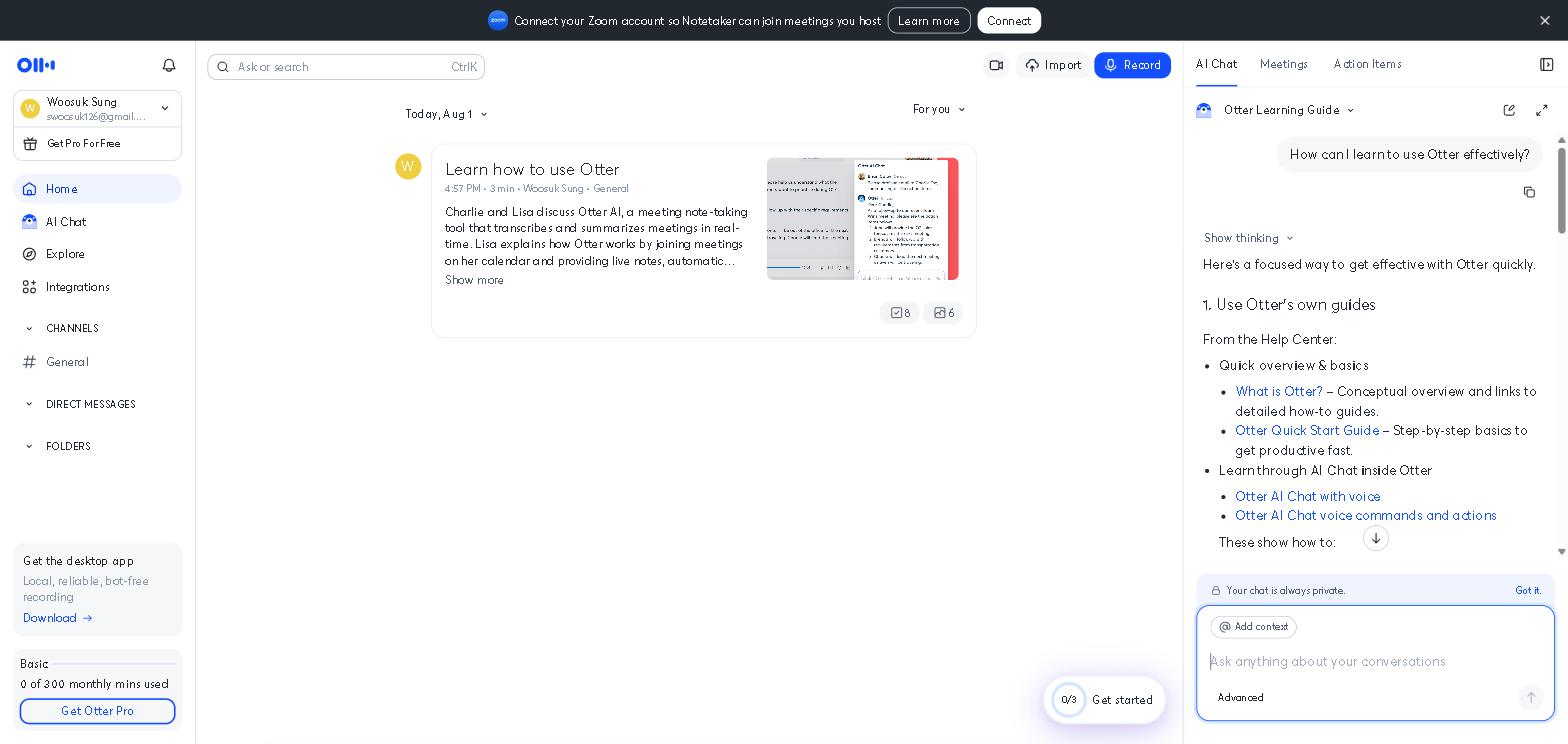
Otter.ai review 2026 — after testing it across three months of real meetings, client calls, and lectures, here’s my honest take: Otter.ai is one of the few AI tools that delivers exactly what it promises, with little to no gap between the marketing and the reality.
I started using Otter.ai when I realized I was spending 20–30 minutes after every meeting rewriting notes from memory — time that added up to nearly 2 hours per week across multiple weekly calls. Within the first week of using Otter, that post-meeting admin time dropped to under 5 minutes per call. The free plan covered everything I needed for the first two months.
AI-powered meeting transcription has become one of the fastest-growing categories in productivity software. As remote and hybrid work becomes the norm, the ability to automatically capture, summarize, and search meeting content has shifted from a nice-to-have to an essential workflow tool for most knowledge workers.
According to recent productivity research, automated meeting transcription tools can reduce post-meeting admin time by up to 50% — a significant saving for knowledge workers who attend multiple meetings daily.
If you only care about the short answer: Otter.ai is worth it for anyone who attends more than 3 meetings per week. The free plan is a genuine starting point, and the Pro plan at $10/month is one of the best-value AI subscriptions available in 2026.
Quick Summary
| Feature | Rating |
|---|---|
| Transcription Accuracy | ⭐⭐⭐⭐½ (4.5/5) |
| Summary Quality | ⭐⭐⭐⭐ (4/5) |
| Speaker Identification | ⭐⭐⭐⭐ (4/5) |
| Free Plan Value | ⭐⭐⭐⭐⭐ (5/5) |
| Integrations | ⭐⭐⭐⭐ (4/5) |
| Overall | ⭐⭐⭐⭐½ (4.5/5) |
Verdict: Otter.ai is the most practical AI meeting tool available in 2026. For anyone who spends significant time in meetings, the time savings are immediate and significant — and the free plan makes it risk-free to try.
Should You Use Otter.ai?
- Do you attend more than 3 meetings per week? → Yes, Otter.ai will save you meaningful time
- Do you spend time writing up meeting notes after calls? → Yes, Otter eliminates this entirely
- Are you a student who wants to transcribe lectures? → Yes, the free plan covers this perfectly
- Do you work with remote or hybrid teams? → Yes, shared transcripts improve alignment significantly
- Do you attend only 1–2 meetings per month? → The free plan is more than enough — no need to upgrade
Otter.ai vs Alternatives: Key Differences at a Glance
- Best for meeting transcription: Otter.ai
- Best for video-first teams: Fireflies.ai
- Best for Zoom-native transcription: Zoom AI Companion
- Best free meeting transcription: Otter.ai
- Best for lecture transcription: Otter.ai
- Best for enterprise: Otter.ai Business or Fireflies.ai
What Is Otter.ai?
Otter.ai is an AI-powered transcription and meeting assistant that automatically captures spoken conversation — in meetings, lectures, interviews, or any audio setting — and converts it into searchable, summarized text in real time.
It integrates directly with Zoom, Google Meet, and Microsoft Teams, joining meetings automatically as a participant and generating transcripts and summaries that are available within minutes of the call ending.
For a broader look at how Otter.ai fits into a complete productivity stack, check out our Best AI Tools for Productivity in 2026 guide. For remote workers specifically, our Best AI Tools for Remote Workers in 2026 guide covers Otter.ai alongside other essential tools.
Key Features
Real-Time Transcription
Otter.ai transcribes spoken conversation in real time — so you can read along as the meeting progresses, without waiting for post-processing. In my testing, the real-time accuracy was impressive enough to follow without the audio in most cases.
Automatic Meeting Summaries
After each meeting, Otter generates a structured summary with key points and action items — automatically, without any manual input. During a week of back-to-back calls, this feature alone saved over an hour of post-meeting admin time.
Speaker Identification
Otter identifies and labels different speakers throughout the transcript — making it easy to follow who said what. Accuracy improves significantly when participants are identified in advance or when Otter has been used with the same speakers multiple times.
Action Item Extraction
Otter automatically identifies and highlights action items mentioned during meetings — pulling them into a separate list that can be shared with participants or added to task management tools.
Searchable Transcript Archive
Every meeting transcript is stored and fully searchable — so you can find specific decisions, commitments, or discussion points from any past meeting in seconds. During a recent project, finding a client’s specific requirement from a call three weeks earlier took under 30 seconds in Otter’s search.
Integrations
Otter integrates with Zoom, Google Meet, Microsoft Teams, Slack, Google Calendar, and Salesforce — covering most enterprise and small business tech stacks.
Our Take: What Otter.ai Does Well
The transcription accuracy is genuinely impressive. In my testing across dozens of meetings with multiple speakers, varying accents, and occasional background noise, Otter’s accuracy was consistently above 90% — high enough to be useful immediately without extensive correction. Technical vocabulary and proper nouns occasionally caused errors, but these were easy to spot and correct.
The automatic summary saves real time. The most impactful feature in daily use wasn’t the transcript itself — it was the automatic summary. After a 60-minute strategy call with five participants, Otter produced a clean summary with the key decisions and action items in under 2 minutes. Writing that summary manually would have taken 15–20 minutes. For teams with multiple meetings daily, that saving compounds quickly.
The free plan is genuinely capable. Unlike many AI tools where the free plan feels like a teaser, Otter’s free tier — 300 monthly transcription minutes, basic summaries, and mobile app access — covers most individual users’ needs without payment. During the first two months of testing, the free plan was sufficient for all my meeting transcription needs.
Our Take: Where Otter.ai Falls Short
Speaker identification requires setup. Otter’s speaker identification is good but not perfect out of the box — it performs best when participants are identified in advance or have been transcribed by Otter before. In meetings with new participants or large groups, attribution errors are more common.
Technical vocabulary causes occasional errors. In meetings involving specialized terminology — technical, legal, or medical vocabulary — Otter occasionally mis-transcribes domain-specific terms. For most business meetings, this is a minor issue. For highly technical fields, it requires more manual correction.
The summary can miss nuance. Otter’s automatic summaries are excellent at capturing explicit decisions and action items — but can miss implicit understandings, tone, and context that a human note-taker would include. For high-stakes meetings, reviewing the full transcript rather than relying solely on the summary is advisable.
Otter.ai Pricing
| Plan | Price | What’s Included |
|---|---|---|
| Free | Free | 300 min/month, 30 min per conversation, basic features |
| Pro | $10/month | 1,200 min/month, 90 min per conversation, advanced summaries |
| Business | $20/month per user | 6,000 min/month, team features, Salesforce integration |
Our recommendation: Start with the free plan — it covers most individual users’ needs. Upgrade to Pro ($10/month) if you regularly hit the 300-minute monthly limit or need longer individual meeting transcriptions. The Business plan is worth considering for teams of three or more who share meeting notes regularly.
Otter.ai vs Fireflies.ai
Both Otter.ai and Fireflies.ai are excellent AI meeting transcription tools — but they serve slightly different needs.
Otter.ai is better for individual users, students, and small teams who need reliable transcription with a generous free plan. Its interface is more intuitive, and its free tier is more capable than Fireflies.ai’s.
Fireflies.ai is better for larger teams and enterprise use cases — with stronger CRM integrations, more advanced analytics, and better support for complex multi-platform workflows.
For most individual users and small teams, Otter.ai is the better starting point. For enterprise teams already invested in Salesforce or HubSpot workflows, Fireflies.ai may offer better integration depth.
Who This Is NOT For
Skip Otter.ai if you:
- Attend fewer than 2 meetings per month — the free plan of any tool is overkill at that volume
- Work primarily in Microsoft Teams with an existing enterprise transcription solution — Teams’ built-in transcription may already cover your needs
- Need perfect accuracy for highly technical or medical transcription — consider specialized transcription services for high-stakes accuracy requirements
- Prefer to take manual notes as part of your active listening process — Otter works best for users who want to focus on conversation rather than documentation
Frequently Asked Questions
Is Otter.ai accurate?
In our testing, Otter.ai achieved above 90% accuracy in most meeting scenarios — high enough to be useful immediately. Accuracy drops slightly with strong accents, technical vocabulary, and poor audio quality.
Can Otter.ai join meetings automatically?
Yes — Otter’s calendar integration allows it to automatically join Zoom, Google Meet, and Teams meetings without manual activation.
Is Otter.ai free?
Otter.ai has a free plan that includes 300 transcription minutes per month and 30 minutes per conversation — enough for most individual users with moderate meeting loads.
Is Otter.ai worth it for students?
Yes — the free plan covers lecture transcription effectively, and the searchable archive is particularly valuable for exam preparation. For more AI tools designed for students, check out our Best AI Tools for Students in 2026 guide.
Final Thoughts
Otter.ai is one of the most immediately useful AI tools available in 2026 — and one of the few where the value is obvious from the first meeting you transcribe. The time savings on post-meeting note-taking are real, immediate, and compounding.
Start with the free plan and run it across your next five meetings. If the automatic summaries change how you prepare for and follow up on calls, the $10/month Pro upgrade will feel like an obvious decision.
Have you used Otter.ai? Share your experience in the comments below!
Last updated: May 2026
Written by Ian Sung — IT professional and AI tools reviewer with 2+ years of hands-on experience testing 50+ AI tools across writing, productivity, automation, and content creation workflows.
Pingback: Best AI Tools for Remote Workers in 2026 | AI Tool Spot
Pingback: Best AI Tools for Managers in 2026 (What Actually Works) | AI Tool Spot
Pingback: Best AI Tools for Productivity in 2026 | The AI Tool Spot
Pingback: Stop Wasting Time: Best AI Tools for Student Productivity in 2026 | AI Tool Spot
Pingback: Best AI Tools for Freelancers in 2026 | AI Tool Spot
Pingback: Best AI Tools for Small Businesses in 2026 (Tested & Reviewed) | AI Tool Spot