TL;DR: The best AI tools for student productivity in 2026 can save you hours every week — without sacrificing grades or sleep. Notion AI organizes your notes, ChatGPT handles planning and writing, and Grammarly catches every error before you submit. Most of it is completely free.
Student life in 2026 is more demanding than ever — but the best AI tools for student productivity are making it easier to stay on top of everything.
Most students don’t struggle because they lack intelligence or work ethic. They struggle because they’re trying to manage five courses, deadlines across different platforms, lecture notes they can’t find when it matters, and assignment planning that eats into their actual study time. AI tools eliminate most of that friction — automatically and for free.
An honest note on methodology: ChatGPT and Google Gemini are part of my daily work. Notion AI and Grammarly I’ve checked on their free plans, and Todoist AI is covered from its official documentation and verified user reviews. Each section says which applies.
Four in five university students now use generative AI, according to Stanford HAI’s 2026 AI Index — which makes the difference between students less about access and more about which tasks they hand over.
If you only care about the short answer: start with ChatGPT for planning and Grammarly for writing. Both are free and deliver results from the first week.
Should You Use These AI Tools?
- Do you miss deadlines or feel overwhelmed by competing assignments? → Yes, Todoist AI and ChatGPT help significantly
- Do you take lots of notes but struggle to find them when studying? → Yes, Notion AI is built for this
- Are you worried about academic integrity? → Read our section on AI and academic integrity below
- Is your university’s AI policy unclear? → Always check with your institution before using AI for graded work
Quick Comparison Table
Bottom line: ChatGPT, Google Gemini, Grammarly and Todoist AI all have strong free plans. You can build a complete student productivity toolkit without spending anything.
Best AI Student Productivity Tools: Key Differences at a Glance
- Best for note organization: Notion AI
- Best for planning and writing: ChatGPT
- Best for Google Docs users: Google Gemini
- Best for deadline management: Todoist AI
- Best for academic writing quality: Grammarly
- Best free student toolkit: ChatGPT + Notion AI + Grammarly
1. Notion AI — Best for Notes and Organization
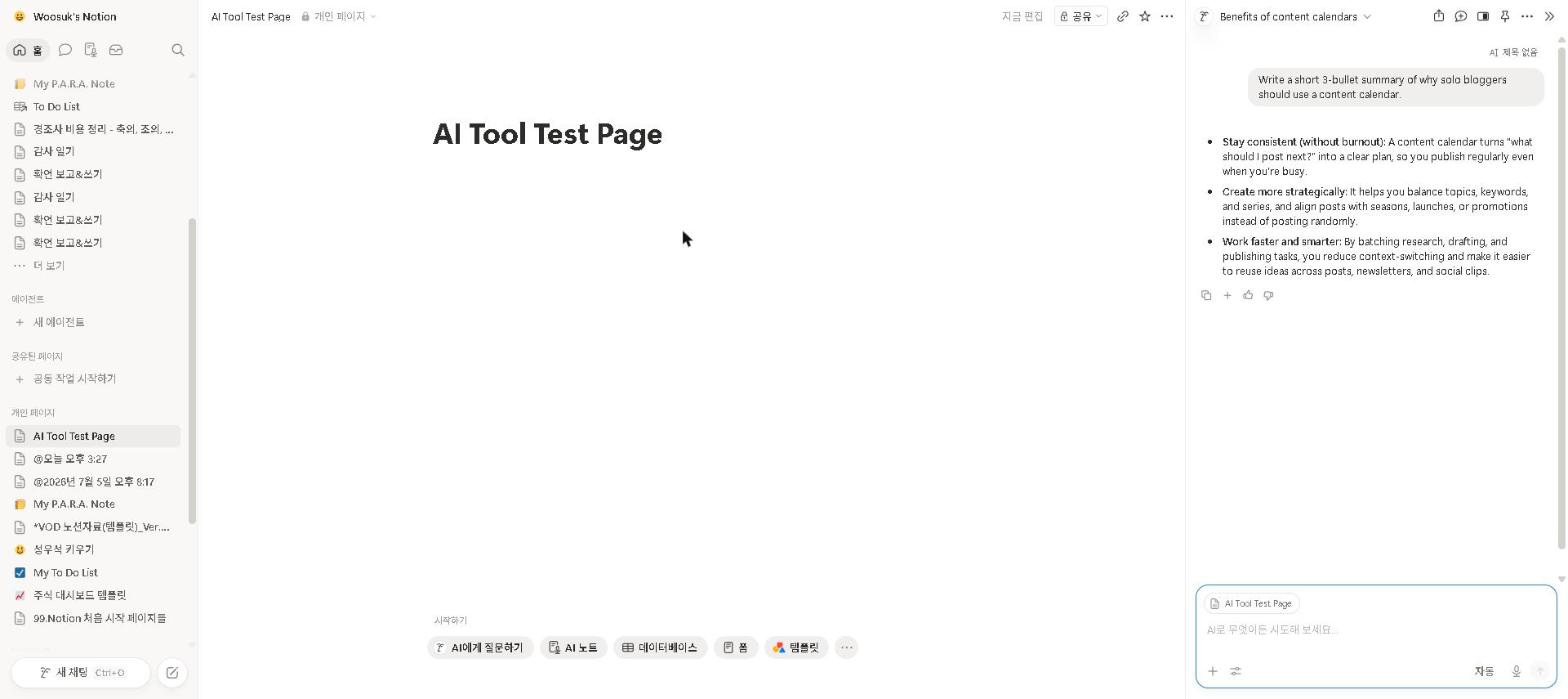
Why it’s essential for students: Most students don’t fail because they lack knowledge — they fail because they can’t find their notes when it matters. Notion AI solves that problem permanently.
Best for: Organizing notes, assignments, and projects in one place
Notion AI combines one of the most powerful note-taking apps with a built-in AI assistant — making it one of the best AI study tools for students who struggle to stay organized. You can take lecture notes, manage assignment deadlines, track reading lists, and use AI to summarize and clean up everything in one workspace.
For a deeper look at Notion AI’s full feature set, check out our Notion AI Review 2026.
Key Features
- AI-powered note summarization and cleanup
- Assignment and deadline tracking
- Reading list and project management
- Q&A on your own notes — find information instantly
- Works across all devices
Our Take
We’ve only checked Notion AI on a free-plan workspace, so this leans on Notion’s documentation and verified user reviews. The feature students value most is AI search across the whole workspace: ask a question and it pulls the relevant points from weeks of scattered lecture notes, instead of you paging through them before a deadline. For students who take a lot of notes but struggle to review them, that’s the reason to use it.
Pricing: Free and Plus include a capped AI trial only / full AI is included in Business at $20 per member per month
2. ChatGPT — Best for Writing and Planning
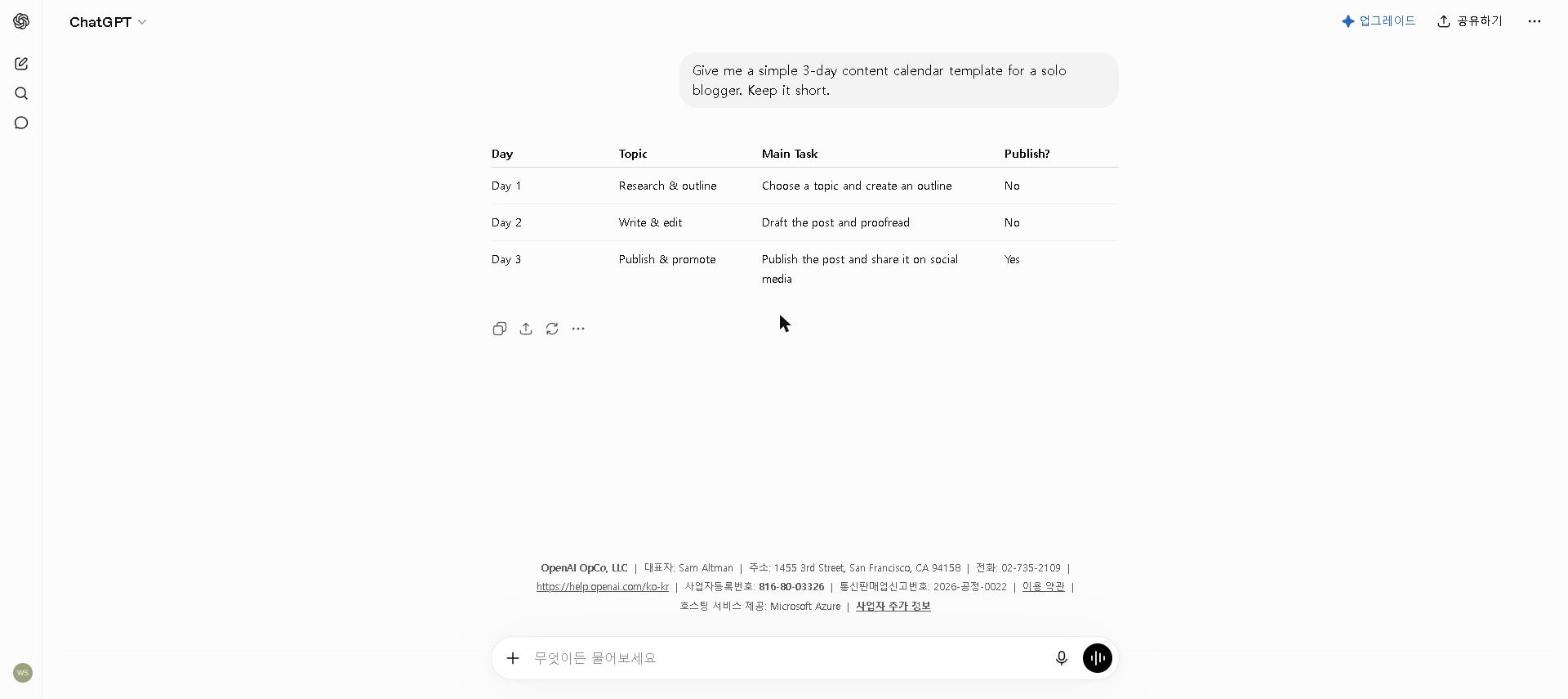
Why it’s essential for students: Students spend a disproportionate amount of time on tasks that aren’t actually learning — drafting emails, planning schedules, summarizing readings. ChatGPT handles all of these in seconds.
Best for: Drafting emails, planning projects, and general productivity tasks
ChatGPT is the most versatile free AI tool for students in 2026. Whether you need to draft an email to a professor, plan a group project, create a study schedule, or summarize a long reading, ChatGPT handles it faster than any other tool on this list.
For tips on using AI to improve your academic writing, check out our How to Use AI to Write Better Essays in 2026 guide. For tips on getting the most from the free plan, see our How to Use ChatGPT for Free in 2026 guide.
Key Features
- Drafts emails, messages, and documents
- Creates study schedules and project plans
- Summarizes long readings and articles
- Helps prioritize tasks and manage workload
- Available free with generous daily limits
Our Take
Give ChatGPT your deadlines, commitments and the hours you actually have, and ask for a realistic study schedule that puts the most urgent work first. It turns an overwhelming week into a plan quickly — and the plan is usually more realistic than one made in a panic. For students juggling competing demands, ChatGPT as a planning partner is one of the highest-impact free tools available.
Pricing: Free / $20 per month (Plus)
3. Todoist AI — Best for Task Management
Why it’s essential for students: Keeping assignment deadlines in your head is a recipe for missed submissions. Todoist AI captures everything automatically and prioritizes it for you — so nothing slips through.
Best for: Managing assignments, deadlines, and daily tasks
Todoist is one of the most popular task managers in the world — and its AI features have made it significantly more useful for students. The natural language input means you can add tasks the way you think, and the AI assistant helps you prioritize and plan realistically.
Key Features
- Natural language task input
- AI-powered task prioritization and scheduling
- Assignment and deadline tracking
- Integrates with Google Calendar
- Free plan covers most student needs
Our Take
We have not used Todoist ourselves; this is based on its official documentation and verified user reviews. The feature students cite most is natural-language input — typing “submit psychology essay by Thursday 11pm, high priority” and getting back a properly scheduled, prioritized task — which removes the setup friction that often turns into procrastination.
Pricing: Free / $7 per month ($5 on annual billing)
4. Google Gemini — Best for Google Docs and Gmail
Why it’s essential for students: Most students already do their academic work in Google Docs and Gmail. Gemini works directly inside both — making it the most frictionless free AI tool for students in Google’s ecosystem.
Best for: Students who use Google Docs, Gmail, and Drive for their academic work
Most students already use Google’s tools for their academic work — and Gemini integrates directly into all of them. Being able to ask Gemini to help with a Google Doc assignment, summarize a long PDF in Drive, or draft a professional email to a professor without switching apps is genuinely useful.
For a deeper look at Gemini’s full feature set, check out our Google Gemini Review 2026.
Key Features
- Works directly inside Google Docs, Gmail, and Drive
- Summarizes documents and PDFs
- Drafts and improves emails to professors
- Real-time web search for current information
- Completely free with a Google account
Our Take
Gemini’s Google Docs integration is the reason to use it here: summarizing a long reading and drafting your own response can happen in the same document, without switching tabs, copying and pasting, and losing context. For students who do most of their academic work in Google Docs and Gmail, that friction reduction adds up. Check which Google plan includes the in-app panel for your account.
Pricing: Free / $19.99 per month (Google AI Pro)
5. Grammarly — Best for Academic Writing Quality
Why it’s essential for students: In academic work, how you express ideas matters as much as the ideas themselves. Grammarly catches the errors that cost you marks — in real time, before you submit.
Best for: Improving the quality and professionalism of academic writing
Grammarly works directly inside Google Docs, Gmail, and virtually every other writing platform students use — catching grammar errors, improving clarity, and checking tone in real time.
For a full breakdown of Grammarly’s features, read our Grammarly Review 2026.
Key Features
- Real-time grammar and spelling checking
- Clarity and style suggestions
- Tone detection for formal academic writing
- Plagiarism checker (Premium)
- Works inside Google Docs, Gmail, and more
Our Take
We’ve only checked Grammarly on the free plan, so this leans on its documentation and verified user reviews. Students credit it most with catching the errors that slip through in long essays, where attention fades toward the end, and with the tone check on emails to professors — flagging when a message reads as too casual or too demanding before it’s sent.
Pricing: Free / $30 per month ($12 on annual billing) — the plan is now called Pro
The Best Free Student AI Toolkit in 2026
If you’re starting today, use this exact setup:
- ChatGPT (free) → planning, writing, and summarizing
- Grammarly (free) → academic writing quality
This combination alone addresses the three biggest student productivity challenges — and costs nothing to set up.
Add these when your needs grow:
- Notion AI (free) → organizing notes and projects
- Todoist AI (free) → deadline and task management
- Google Gemini (free) → Google Docs and Gmail integration
A Note on AI and Academic Integrity
AI tools are powerful — but how you use them determines whether they help or hurt your academic standing.
Using AI as a learning tool is not cheating. Using AI to organize notes, plan your schedule, transcribe lectures, or improve your writing is no different from using a library, a writing center, or a study group.
Submitting AI-generated work as your own is cheating. Always add your own analysis, rewrite in your own voice, and understand what you’re submitting before you submit it.
Always check your institution’s policy. AI policies vary significantly across universities — some prohibit any use, others actively encourage it for specific tasks. Know the rules before using any AI assistance for graded work.
For a detailed guide on using AI responsibly for academic writing, check out our How to Use AI to Write Better Essays in 2026 guide.
Who This Is NOT For
Skip this toolkit if you:
- Are in your first week of university and haven’t established any workflow yet — build basic habits first, then optimize
- Attend a university that prohibits AI tools entirely for academic work — always check your institution’s policy first
- Only have one or two assignments per semester — the setup time won’t be worth it at very low volume
- Prefer pen-and-paper note-taking and aren’t comfortable switching to digital tools
Best AI Student Productivity Tools by Use Case
- Best AI tool for student note-taking: Notion AI
- Best AI tool for student planning: ChatGPT or Todoist AI
- Best AI tool for Google Docs users: Google Gemini
- Best free AI tools for students: ChatGPT + Google Gemini
- Best AI tool for deadline management: Todoist AI
- Best AI tool for academic writing: Grammarly
- Best AI study tools for exam prep: Notion AI + ChatGPT
Are These AI Tools Worth It for Students?
For students managing a full course load alongside other commitments, the answer is a clear yes — especially given that most of these tools are completely free.
The time savings are real and immediate. The free AI tools on this list can save students hours every week on admin, planning, and communication tasks. That’s time that can go back into studying, sleeping, or having a life outside university.
The quality improvement matters for grades. Grammarly catches errors that cost marks. Notion AI helps you find and connect information more effectively when studying. These aren’t marginal improvements — they directly affect academic outcomes.
The free plans cover everything most students need. ChatGPT, Grammarly, Google Gemini and Todoist AI all offer genuinely capable free plans. You can build a complete AI study toolkit without spending a dollar.
Start with one tool, not six. Start with ChatGPT for planning — use it consistently for two weeks — then add the next tool.
Final Thoughts
The best AI tools for student productivity in 2026 have made student life significantly more manageable. Whether you need help staying organized, keeping up with lectures, managing deadlines, or improving your academic writing, there’s a free AI tool on this list that can help.
Start with the free setup — ChatGPT for planning and Grammarly for writing. Add Notion AI and Todoist AI as your needs grow. Together, they cover every major student productivity challenge without costing anything.
What’s been the hardest part of staying productive as a student in 2026? Share in the comments — we read every one and do our best to help find solutions.
Last updated: September 2026
Written by Ian Sung — IT professional working in automation, scripting and workflow tooling. ChatGPT, Claude and Google Gemini are part of my daily work; every other tool covered here is assessed from a free-plan check, official documentation and verified user reviews, and each review says which applies.
Pingback: Otter.ai Review 2026: Is It Worth It? (Honest Review) | AI Tool Spot
Pingback: Perplexity AI vs ChatGPT: Which Is Better in 2026? | AI Tool Spot