TL;DR: Grammarly review 2026 — Grammarly remains one of the most practical writing tools available, and the free plan is worth installing for everyone. The real-time tone detection and seamless cross-platform integration make it genuinely valuable for professional communication — even alongside Claude and ChatGPT.
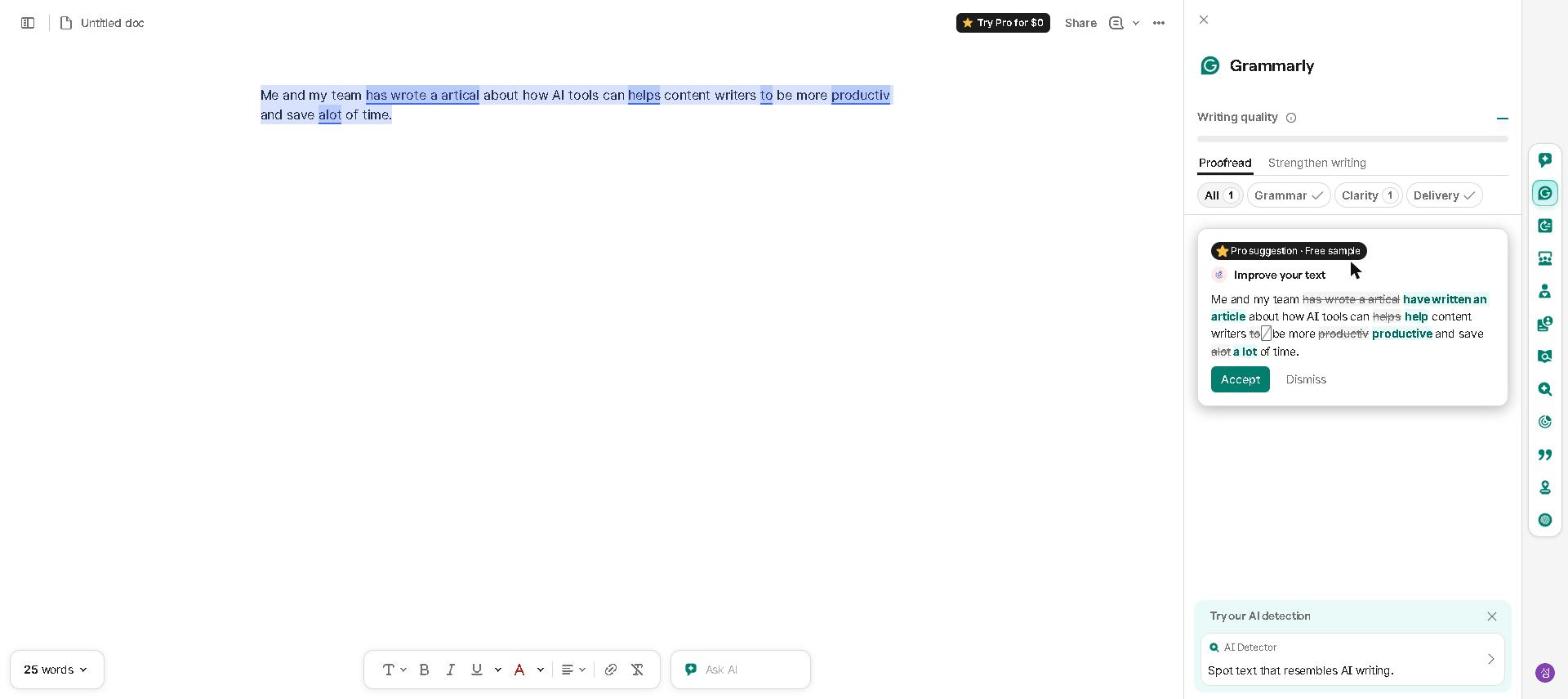
Here’s an actual correction Grammarly caught, screenshotted from a free-plan account we set up to check it:
Grammarly has been the go-to writing assistant for millions of people for years — but in 2026, the competition has never been stronger. With ChatGPT, Claude, and other AI tools now offering writing assistance, is Grammarly still worth it?
Grammarly fills a different role from Claude and ChatGPT, which we do use daily. Grammarly works in real time, inside whichever app you write in, without you having to think about it. Claude and ChatGPT require you to switch context, copy text, and make a deliberate decision to use them. That difference — passive and always-on versus deliberate and powerful — is what decides whether Grammarly earns a place alongside a general AI assistant rather than competing with it.
Grammarly is used by over 40 million daily active users worldwide — making it one of the most widely adopted writing tools ever built, and a meaningful signal that its core value proposition resonates across a wide range of use cases.
If you only care about the short answer: install Grammarly’s free browser extension — it takes two minutes and immediately improves everything you write. Decide whether to upgrade to Premium after using it for a month.
Should You Use Grammarly?
- Do you send a lot of professional emails or business communications? → Yes, Grammarly is essential
- Are you a non-native English speaker? → Yes, Grammarly’s real-time checking is particularly valuable
- Do you need tone feedback before sending sensitive messages? → Yes, this is Grammarly’s killer feature
- Do you primarily need to generate long-form content from scratch? → No — use Claude or ChatGPT for this
- Are you already paying for Claude Pro or ChatGPT Plus? → Start with Grammarly free before adding another paid subscription
Quick Summary
| Feature | Rating |
|---|---|
| Grammar & Spelling | ⭐⭐⭐⭐⭐ (5/5) |
| Tone Detection | ⭐⭐⭐⭐⭐ (5/5) |
| Writing Suggestions | ⭐⭐⭐⭐ (4/5) |
| AI Writing Assistant | ⭐⭐⭐⭐ (4/5) |
| Free Plan Value | ⭐⭐⭐⭐⭐ (5/5) |
| Overall | ⭐⭐⭐⭐½ (4.5/5) |
Verdict: Grammarly remains one of the most practical writing tools available in 2026. Its real-time grammar checking, tone detection, and seamless browser integration make it genuinely useful for anyone who writes professionally — and the free plan is surprisingly capable.
What Is Grammarly?
Grammarly is an AI-powered writing assistant that checks grammar, spelling, style, and tone in real time — working across Gmail, Google Docs, Slack, Microsoft Word, and virtually every other platform where you write. In 2026, it has expanded significantly beyond basic grammar checking to include a full AI writing assistant capable of drafting, rewriting, and improving content from scratch.
It’s one of the most widely used writing tools in the world, with over 40 million daily active users — and for good reason.
Key Features
Real-Time Grammar and Spelling Checking
Grammarly’s core feature remains its most reliable. It catches grammar errors, spelling mistakes, and punctuation issues in real time — across every platform where you write, through its browser extension and desktop app.
Tone Detection
One of Grammarly’s most distinctive features is its tone detector. It analyzes your writing and tells you how it’s likely to be perceived — confident, friendly, formal, direct, or dozens of other tones — before you hit send.
Style and Clarity Suggestions
Beyond grammar, Grammarly suggests improvements for clarity, conciseness, and readability — flagging overly complex sentences, unnecessary words, and unclear phrasing.
AI Writing Assistant (Grammarly GO)
Grammarly GO is the AI writing feature that allows you to draft emails, rewrite paragraphs, adjust tone, and generate content from scratch using simple prompts — all within the Grammarly interface.
Plagiarism Checker
Grammarly Pro includes a plagiarism checker that scans your text against billions of web pages — useful for academic writing and content creation where originality matters.
Works Everywhere
Grammarly’s browser extension works inside Gmail, Google Docs, Outlook, LinkedIn, Slack, and virtually every other web-based platform — making it one of the most seamlessly integrated writing tools available.
Our Take: What Grammarly Does Well
Real-time grammar checking is what it is known for. The consistent theme across verified user reviews on G2 and Trustpilot is that Grammarly catches more than the built-in Google Docs spell-checker or Microsoft Editor, with fewer false positives — particularly for style and clarity issues that basic spell-checkers do not address at all. That is a comparison we are reporting from those reviews, not one we ran ourselves.
The tone detection is Grammarly’s killer feature. It flags when a draft reads as more aggressive, dismissive or casual than intended, and suggests specific changes that keep the message clear without escalating. Reviewers cite it most for exactly the moments tone is likeliest to slip — writing under pressure. For anyone who writes high-stakes messages, that real-time feedback is genuinely valuable.
It works everywhere without friction. Unlike AI writing tools that require switching apps or copying and pasting content, Grammarly works directly inside whatever platform you’re already using. Users commonly say the integration quickly becomes invisible — it just feels like a natural part of writing.
The free plan is genuinely capable. Grammarly’s free tier covers grammar, spelling, punctuation, and basic style suggestions — more than enough for most everyday writing needs. Many users never need to upgrade.
Our Take: Where Grammarly Falls Short
It’s not a replacement for a full AI writing tool. Grammarly GO is useful for quick drafts and rewrites, but for generating long-form content, Claude or ChatGPT produce significantly better results. Grammarly is best thought of as a writing polish tool rather than a content generation tool. For a full comparison of AI writing tools, check out our Best AI Writing Tools in 2026 guide.
The Premium plan requires more justification. At $12/month on annual billing — $30 if you pay month to month — Grammarly Pro (the plan formerly sold as Premium) is reasonably priced. But when ChatGPT and Claude both offer powerful writing assistance at $20/month — covering far more use cases — the value proposition of Grammarly Pro requires justification if you’re already paying for either.
Style suggestions can feel overly prescriptive. Grammarly sometimes flags stylistic choices that are intentional — particularly for creative writing or content with a distinctive voice. The suggestions can push writing toward a generic corporate tone, which isn’t always what you want.
Grammarly Pricing
| Plan | Price | What’s Included |
|---|---|---|
| Free | Free | Grammar, spelling, punctuation, basic style |
| Premium | $30/mo ($12 annual) | Full suggestions, tone detector, plagiarism checker, Grammarly GO |
| Business | $15/month per user | Team features, style guides, analytics |
Our recommendation: Start with the free plan — it covers most everyday writing needs. Upgrade to Premium if you write professionally and want access to the tone detector, plagiarism checker, and Grammarly GO.
Grammarly vs ChatGPT: Which Is Better for Writing?
Both Grammarly and ChatGPT can improve your writing — but they serve fundamentally different purposes.
Grammarly is better for real-time writing assistance. It works inside every platform you already use, catches errors as you type, and provides tone feedback before you send.
ChatGPT is better for generating and transforming content. It can draft emails, rewrite entire documents, and produce long-form content from scratch — capabilities that go well beyond what Grammarly offers.
The best approach is to use both: ChatGPT to draft and generate, Grammarly to polish and refine. For a detailed look at Claude as a writing tool, check out our Claude AI Review 2026.
Grammarly vs Other AI Writing Tools
| Tool | Best For | Real-Time Checking | Price |
|---|---|---|---|
| Grammarly | Grammar, tone & polish | ✅ Yes | Free / $30/mo ($12 annual) |
| ChatGPT | Content generation | ❌ No | Free / $20/month |
| Claude | Long-form writing | ❌ No | Free / $20/month |
| ProWritingAid | Deep style editing | ❌ No | Free / $10/month |
Who This Is NOT For
Skip Grammarly Pro if you:
- Mainly need to generate long-form content from scratch — use Claude or ChatGPT instead
- Write primarily in one platform like Google Docs where built-in suggestions may suffice
- Are on a tight budget and already pay for ChatGPT Plus or Claude Pro
- Write in a highly creative or distinctive style that resists standardization
- Only write occasionally — the free plan covers infrequent use easily
Frequently Asked Questions
Is Grammarly better than ChatGPT for writing?
They serve different purposes. Grammarly is better for real-time error catching and tone checking. ChatGPT is better for generating and rewriting content from scratch. The best workflow uses both together.
Is the Grammarly free plan good enough?
For most users, yes. The free plan covers grammar, spelling, and basic style suggestions — enough for everyday professional writing. Upgrade to Premium for tone detection and plagiarism checking.
Does Grammarly work in Google Docs?
Yes — Grammarly’s browser extension works directly inside Google Docs, Gmail, Slack, and virtually every other web-based writing platform.
Is Grammarly worth it for students?
Yes — particularly for non-native English speakers and anyone writing academic papers. The free plan covers most student needs. For a full student AI toolkit, check out our Best Free AI Tools for Students in 2026 guide.
Is Grammarly Worth It in 2026?
For professional communicators, the answer is yes — with some nuance.
The free plan is worth installing for everyone. Even if you never upgrade, Grammarly’s free grammar and spelling checking is genuinely useful — and the browser extension installs in seconds.
The Premium plan requires more justification. The key differentiator is the real-time tone detection and plagiarism checker, which neither ChatGPT nor Claude offers in the same seamless, always-on way.
It’s most valuable for high-stakes communication. For anyone who regularly sends emails to clients, writes reports for senior stakeholders, or produces content that reflects on their professional reputation, Grammarly’s real-time feedback is worth the price.
Use it alongside, not instead of, other AI tools. Grammarly works best as the final layer of polish in a writing workflow that uses Claude or ChatGPT for generation and Grammarly for refinement.
Final Thoughts
Grammarly remains one of the most practical writing tools available in 2026. Its real-time grammar checking, tone detection, and seamless cross-platform integration make it genuinely useful for anyone who writes professionally — and the free plan makes it easy to try without any commitment.
Install the free browser extension, use it for a week, and see how it changes your writing process. If you find yourself relying on the tone detector and wanting access to the plagiarism checker, the Premium plan is worth the upgrade.
Have you used Grammarly in 2026? Share your experience in the comments below!
Last updated: September 2026
Written by Ian Sung — IT professional working in automation, scripting and workflow tooling. ChatGPT, Claude and Google Gemini are part of my daily work; every other tool covered here is assessed from a free-plan check, official documentation and verified user reviews, and each review says which applies.
Pingback: How to Use AI to Write Better Essays in 2026 | AI Tool Spot
Pingback: Best AI Tools for Productivity in 2026 | The AI Tool Spot
Pingback: Best AI Tools for Managers in 2026 (What Actually Works) | AI Tool Spot
Pingback: How to Use AI to Write Better Emails in 2026 | AI Tool Spot
Pingback: Best AI Tools for Freelancers in 2026 | AI Tool Spot
Pingback: Best AI Tools for Remote Workers in 2026 | AI Tool Spot
Pingback: Best AI Tools for Small Businesses in 2026 (Tested & Reviewed) | AI Tool Spot
Pingback: Best AI Tools for Students on a Budget (2026 Guide) | AI Tool Spot
Pingback: How I Decide If an AI Tool Is Worth My Time (My 3-Step Filter) | AI Tool Spot
Pingback: My AI Productivity Stack in 2026 (What I Actually Use Every Day) | AI Tool Spot
Pingback: How I Use AI Tools Every Day to Save 3 Hours (My Real Workflow in 2026) | AI Tool Spot
Pingback: Best AI Tools for Entrepreneurs in 2026 (Tested & Reviewed) | AI Tool Spot
Pingback: Stop Wasting Time: Best AI Tools for Student Productivity in 2026 | AI Tool Spot