TL;DR: ChatGPT’s free plan in 2026 is genuinely powerful — giving you access to one of the most capable AI models available at no cost. This guide covers exactly how to use ChatGPT for free in 2026, including the best prompting techniques, most valuable use cases, and when it’s worth upgrading to Plus.
Here’s an actual screenshot from the free version of ChatGPT:
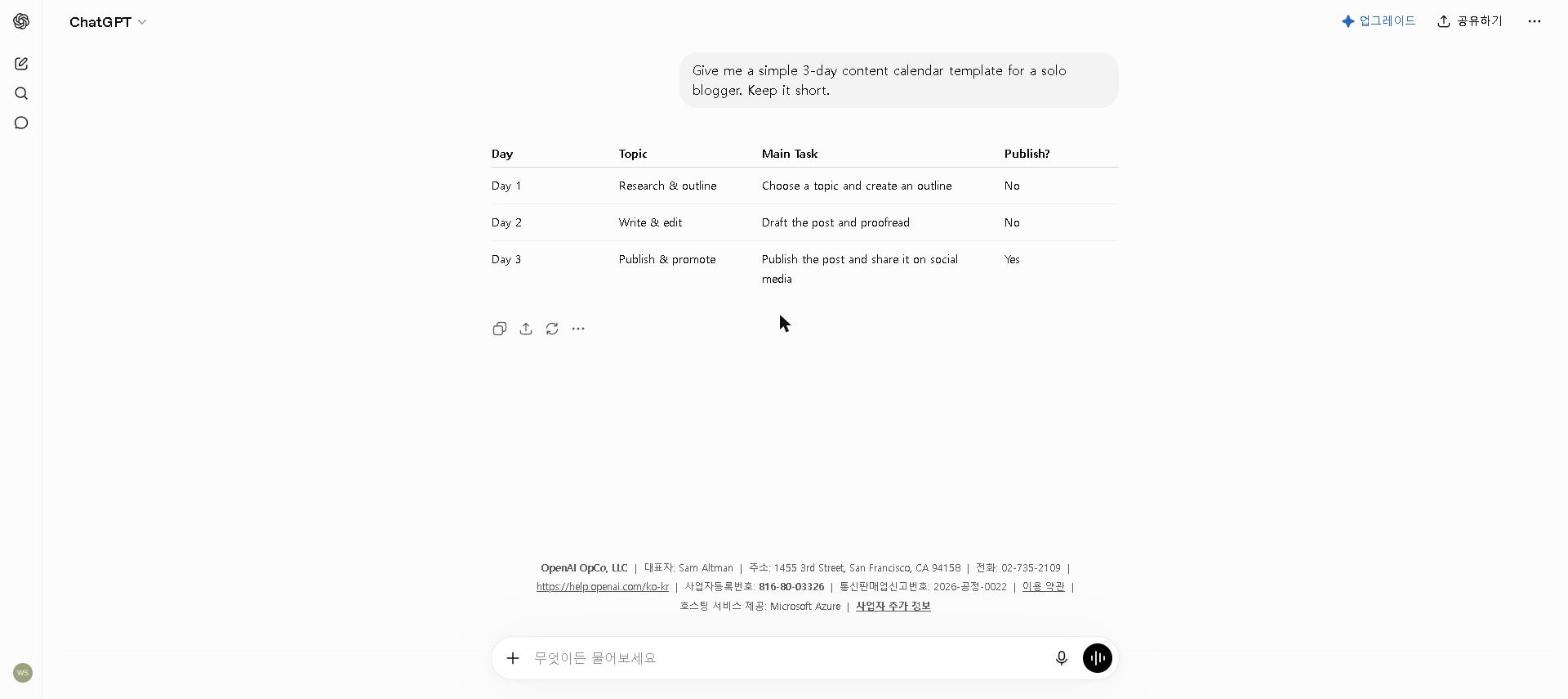
Learning how to use ChatGPT for free in 2026 is one of the most practical things anyone can do right now — and the free plan is significantly more capable than most people expect.
The free plan handles more of everyday use than most people expect. Its limits tend to show up in predictable places — heavy image generation, long coding sessions, and running several complex conversations at once. Outside of those scenarios, it is genuinely capable.
Generative AI reached 53% of the global population within three years of launch, faster than either the personal computer or the internet, according to Stanford HAI’s 2026 AI Index. The free plan is what most of them are using.
If you only care about the short answer: sign up at chat.openai.com, start with specific prompts, and use the memory feature. The free plan covers most everyday needs — upgrade to Plus only when you’re consistently hitting limits during your workday.
Should You Use ChatGPT’s Free Plan?
- Are you new to AI tools and want to get started? → Yes, ChatGPT free is the best starting point
- Do you write emails, reports, or content regularly? → Yes, the free plan handles this easily
- Do you need research help with cited sources? → Pair ChatGPT with Perplexity AI — check our Perplexity AI Review 2026
- Do you hit daily message limits regularly? → Consider upgrading — see our Is ChatGPT Plus Worth It in 2026? guide
- Are you a student? → Yes — check our Best Free AI Tools for Students in 2026 guide for the full student toolkit
What Do You Get for Free?
| Feature | Free Plan | Plus Plan ($20/month) |
|---|---|---|
| AI Model | Latest model (limited) | Latest model (full access) |
| Message Limit | ~10 messages per 5 hours | Much higher limits |
| Image Generation | ✅ Limited (5/day) | ✅ Full access |
| File Uploads | ✅ Yes | ✅ Yes |
| Web Browsing | ✅ Yes | ✅ Yes |
| Voice Mode | ✅ Basic | ✅ Advanced |
| Memory | ✅ Yes | ✅ Yes |
The free plan is genuinely useful for most everyday tasks. The main limitation is the message limit — once you hit it, you’ll need to wait before sending more messages.
Step 1: Create a Free ChatGPT Account
Getting started with ChatGPT for free takes less than two minutes.
How to sign up:
- Go to chat.openai.com
- Click “Sign up”
- Enter your email address or sign up with Google or Apple
- Verify your email
- You’re in — no credit card required
Step 2: Learn the Basic Interface
Once you’re logged in, the ChatGPT interface is straightforward.
Key elements:
- Chat window: Where you type your messages and see responses
- New chat button: Start a fresh conversation
- Conversation history: Access your previous chats on the left sidebar
- Model selector: Choose which AI model to use
A habit worth building early: Starting a new chat for each new topic noticeably improves response quality. Long, meandering conversations make ChatGPT lose track of context and produce increasingly confused responses.
Step 3: Write Better Prompts
The quality of ChatGPT’s responses depends almost entirely on how you ask. This is the single most important skill to develop.
Be specific:
Instead of: “Write me an email”
Try: “Write a professional follow-up email to a client who hasn’t responded in two weeks. Keep it polite and under 100 words.”
Give context:
Instead of: “Explain machine learning”
Try: “Explain machine learning to me like I’m a complete beginner with no technical background.”
Ask for a format:
Instead of: “Give me ideas for my blog”
Try: “Give me 10 blog post ideas about AI tools for small businesses. Format them as a numbered list with a one-sentence description for each.”
If the output feels generic: the problem is usually the prompt, not the tool. Being more specific about context, audience, tone and format improves the result more than anything else. Try adding detail to your prompt before concluding ChatGPT isn’t useful.
Step 4: Best Free Use Cases for ChatGPT
Here are the most valuable ways to use ChatGPT’s free plan in 2026.
Writing and editing:
- Draft emails, reports, and blog posts
- Improve and proofread existing writing
- Rewrite content in a different tone or style
- Generate outlines and structures for long pieces
Research and learning:
- Explain complex topics in simple language
- Summarize long articles and documents
- Answer questions on virtually any subject
- Generate study guides and explanations
Productivity:
- Create to-do lists and action plans
- Draft meeting agendas
- Summarize meeting notes into key points
- Generate templates for repetitive tasks
Coding help:
- Debug code errors
- Explain what a piece of code does
- Generate simple scripts and functions
- Help learn programming concepts
Where the free plan earns its keep: Email drafting and document summarization are where it delivers the most consistent value — a well-specified prompt usually produces a draft that needs only light edits.
Step 5: How to Get the Most Out of the Free Plan
Use memory to your advantage: ChatGPT’s memory feature remembers information about you across conversations. Tell it your job, your writing style, and your preferences — and it will tailor responses accordingly.
Start new chats for new topics: ChatGPT performs better when conversations stay focused. For each new task or topic, start a fresh chat rather than continuing an existing one.
Use it iteratively: Don’t expect a perfect response on the first try. Ask ChatGPT to refine, improve, or adjust its output — the iterative process often produces much better results than a single prompt. For longer pieces, expect several rounds of refinement.
Save useful outputs immediately: ChatGPT doesn’t save your outputs anywhere other than the chat history. For anything important, copy and paste the response into a document immediately.
Free vs. Paid: When Should You Upgrade?
Upgrade to Plus if you:
- Hit message limits regularly during your workday
- Need priority access during peak hours
- Want higher quality image generation
- Use ChatGPT as a core part of your daily professional workflow
Stay on free if you:
- Use ChatGPT occasionally rather than daily
- Mainly need it for writing and research tasks
- Are just getting started with AI tools
- Want to test it before committing to a subscription
For a detailed comparison of the free and paid plans, check out our Is ChatGPT Plus Worth It in 2026? guide.
Best Free Alternatives to ChatGPT
If you hit ChatGPT’s free limits, these alternatives are worth trying:
- Claude: Excellent for long-form writing and analysis — see our Claude AI Review 2026
- Google Gemini: Best for Google Workspace users — see our Google Gemini Review 2026
- Perplexity AI: Best for research with cited sources — see our Perplexity AI Review 2026
Who This Is NOT For
Skip ChatGPT’s free plan if you:
- Need heavy daily use — you’ll hit limits quickly; consider the paid plan
- Primarily need image generation — the free plan has limited image credits
- Need specialized tools — coding tools like GitHub Copilot may serve developers better
- Require guaranteed uptime — free users may experience slowdowns during peak hours
Final Thoughts
Using ChatGPT for free in 2026 is one of the best decisions you can make for your productivity. The free plan gives you access to one of the most powerful AI tools ever built — at no cost.
Sign up, start with simple tasks, and gradually expand how you use it as you get comfortable. The free plan will handle most of what you need — and when you’re ready to unlock more, the paid plan is always there.
What’s the most useful thing you’ve done with ChatGPT’s free plan? Share in the comments — I’m always looking for new use cases I haven’t thought of.
Last updated: September 2026
Written by Ian Sung — IT professional working in automation, scripting and workflow tooling. ChatGPT, Claude and Google Gemini are part of my daily work; every other tool covered here is assessed from a free-plan check, official documentation and verified user reviews, and each review says which applies.
Pingback: How to Use AI to Write Better Essays in 2026 | AI Tool Spot
Pingback: Best AI Tools for Freelancers in 2026 | AI Tool Spot
Pingback: Best AI Tools for Entrepreneurs in 2026 (Tested & Reviewed) | AI Tool Spot
Pingback: How to Use AI to Learn a New Language in 2026 (Complete Guide) | AI Tool Spot
Pingback: Best Free AI Tools for Students in 2026 | AI Tool Spot
Pingback: Best AI Tools for Productivity in 2026 | The AI Tool Spot
Pingback: Best AI Tools for Remote Workers in 2026 | AI Tool Spot
Pingback: Best AI Tools for Students on a Budget (2026 Guide) | AI Tool Spot
Pingback: Stop Wasting Time: Best AI Tools for Student Productivity in 2026 | AI Tool Spot
Pingback: Best AI Tools for Small Businesses in 2026 (Tested & Reviewed) | AI Tool Spot
Pingback: How to Use AI to Study for Exams in 2026 (Student Guide) | AI Tool Spot
Pingback: Best AI Tools for Managers in 2026 (What Actually Works) | AI Tool Spot
Pingback: Best AI Writing Tools in 2026 (Free & Paid) | AI Tool Spot
Pingback: Best AI Tools for Time Management in 2026 | AI Tool Spot
Pingback: Copy.ai Review 2026: Is It Worth It? (Honest Review) | AI Tool Spot
Pingback: My AI Productivity Stack in 2026 (What I Actually Use Every Day) | AI Tool Spot
Pingback: Best AI Tools for Content Creators in 2026 (Tested & Reviewed) | AI Tool Spot