The best AI tools for time management in 2026 target a specific set of problems: a calendar controlled by other people’s priorities, tasks scattered across too many places, and no clear picture of where the hours actually go.
If you only care about the short answer: start with Reclaim AI for your calendar and RescueTime to understand where your time actually goes. Everything else is secondary until those two are habits.
A note on how this was written: ChatGPT is the only tool here I use every day. Reclaim AI, Motion, Todoist AI and RescueTime are covered from their official documentation and verified user reviews — we haven’t used them ourselves, and each section is written that way.
Should You Use AI Time Management Tools?
- Does your calendar feel chaotic and unmanageable? → Yes, Reclaim AI is built for this
- Do you regularly miss deadlines or feel overwhelmed by competing priorities? → Yes, Todoist AI and Motion are built for this
- Do you feel busy but not productive? → Yes, RescueTime will show you exactly why — and the answer is usually uncomfortable
- Do you manage a team with complex scheduling needs? → Reclaim AI’s paid tier is the nearest option — Clockwise, the tool built for this, shut down in March 2026
- Do you only have one or two tasks per day? → Free plans of ChatGPT cover light planning needs
Quick Comparison Table
| Tool | Best For | Free Plan | Starting Price |
|---|---|---|---|
| Reclaim AI | Smart calendar scheduling | ✅ Yes | $12/mo ($10 annual) |
| Motion | Automatic daily planning | ❌ No | $19/month |
| Clockwise | Team scheduling | — | Discontinued Mar 2026 |
| Todoist AI | AI-powered task management | ✅ Yes | $7/mo ($5 annual) |
| RescueTime | Time tracking & focus | ✅ Yes | $6.50/month |
| ChatGPT | Planning & prioritization | ✅ Yes | $20/month |
Bottom line: The free plans of Reclaim AI, Todoist AI, RescueTime, and ChatGPT together address every major time management challenge — at no cost.
Best AI Time Management Tools: Key Differences at a Glance
- Best for calendar scheduling: Reclaim AI
- Best for automatic daily planning: Motion
- Best for team scheduling: Reclaim AI (paid tier) — Clockwise shut down in March 2026
- Best for task management: Todoist AI
- Best for time tracking: RescueTime
- Best for weekly planning: ChatGPT
- Best free time management toolkit: Reclaim AI + Todoist AI + ChatGPT
1. Reclaim AI — Best for Smart Calendar Scheduling
The problem it’s designed to solve: a calendar that reflects other people’s priorities rather than yours — by midweek every open slot has gone to meetings others scheduled, with no protected time left for focused work.
How it works: Once connected to your calendar with your recurring tasks and priorities, Reclaim AI schedules focus blocks around your meetings automatically — including buffer time between back-to-back calls, which most people never think to protect manually.
The feature reviewers highlight most: habit scheduling. Add a daily deep-work block as a habit and Reclaim defends that time automatically, marking it busy so others can’t schedule over it — without a deliberate decision each morning.
One thing to know: Reclaim AI works with Google Calendar. If your organization uses Outlook as the primary calendar, check compatibility before committing.
For a broader look at how Reclaim AI fits into a complete productivity stack, check out our Best AI Tools for Productivity in 2026 guide.
Pricing: Free / $12 per month ($10 on annual billing)
2. Motion — Best for Automatic Daily Planning
The problem it’s designed to solve: Deciding what to work on next is a cognitive task that adds up. Motion eliminates that decision by automatically building your daily schedule from your task list every morning.
What reviewers consistently report: Motion’s fully automated approach can be impressive when it works — correctly identifying urgent tasks and scheduling them around meetings — but the rigidity is a common complaint when an unexpected priority comes up mid-day, since the whole schedule can feel disrupted in a way that requires more manual intervention than a lighter-touch tool.
Reclaim AI’s approach — assistance rather than full automation — tends to suit workloads with unpredictable day-to-day shifts better. Motion tends to work best for people with more predictable workloads who are comfortable trusting the system to make more of the decisions.
Pricing: $19 per month (no free plan)
3. Clockwise — Discontinued in March 2026
Status: Clockwise shut down on 27 March 2026, after Salesforce hired its team. You can no longer sign up for it. We have kept this entry rather than quietly deleting it, because Clockwise still appears in a lot of older “best AI time-management tool” lists and it is worth knowing why you cannot find it.
What it did: Clockwise moved flexible meetings automatically to build longer blocks of uninterrupted focus time across a whole team, rather than optimising one person’s calendar in isolation.
What to use instead: For the individual version of the same problem, Reclaim AI above is the closest replacement. For team-wide meeting coordination there is no exact equivalent at the same price — Reclaim’s paid tier is the nearest option.
4. Todoist AI — Best for Task Management
The problem it’s designed to solve: tasks scattered across email, notebooks and memory, and the constant low-level drain of keeping track of them — which is where things fall through the cracks.
What reviewers credit it with: natural language capture. Typing “finish quarterly report by Friday afternoon, high priority” creates a properly scheduled, prioritized task, which removes the friction that makes people put off capturing tasks until they “have time to organize them” — and that delay is where things get lost.
A common early friction point: Dumping every existing task into Todoist at once tends to be overwhelming at first — dozens of tasks across multiple projects with no clear starting point. The AI prioritization feature helps, but expect to spend some real setup time organizing things before it becomes genuinely useful. Worth it, but worth knowing upfront.
Pricing: Free / $7 per month ($5 on annual billing)
5. RescueTime — Best for Time Tracking and Focus
The problem it’s designed to solve: the gap between where you think your time goes and where it actually goes.
What users consistently report when they look at the data: The first week of RescueTime data is a common source of genuine surprise — people routinely discover their actual email time and app-switching frequency are significantly higher than they’d estimated. Seeing the data clearly, rather than operating on assumption, is what makes it possible to make targeted changes: blocking distracting apps during core hours, batching email into set windows instead of checking constantly, and similar adjustments that reviewers report increase productive hours without adding total work hours.
One honest caveat: The data is only useful if you’re willing to act on it. The first instinct is to rationalize what you see. Push through that and actually change something based on what RescueTime shows you.
Pricing: Free / $6.50 per month (Premium)
6. ChatGPT — Best for AI-Assisted Weekly Planning
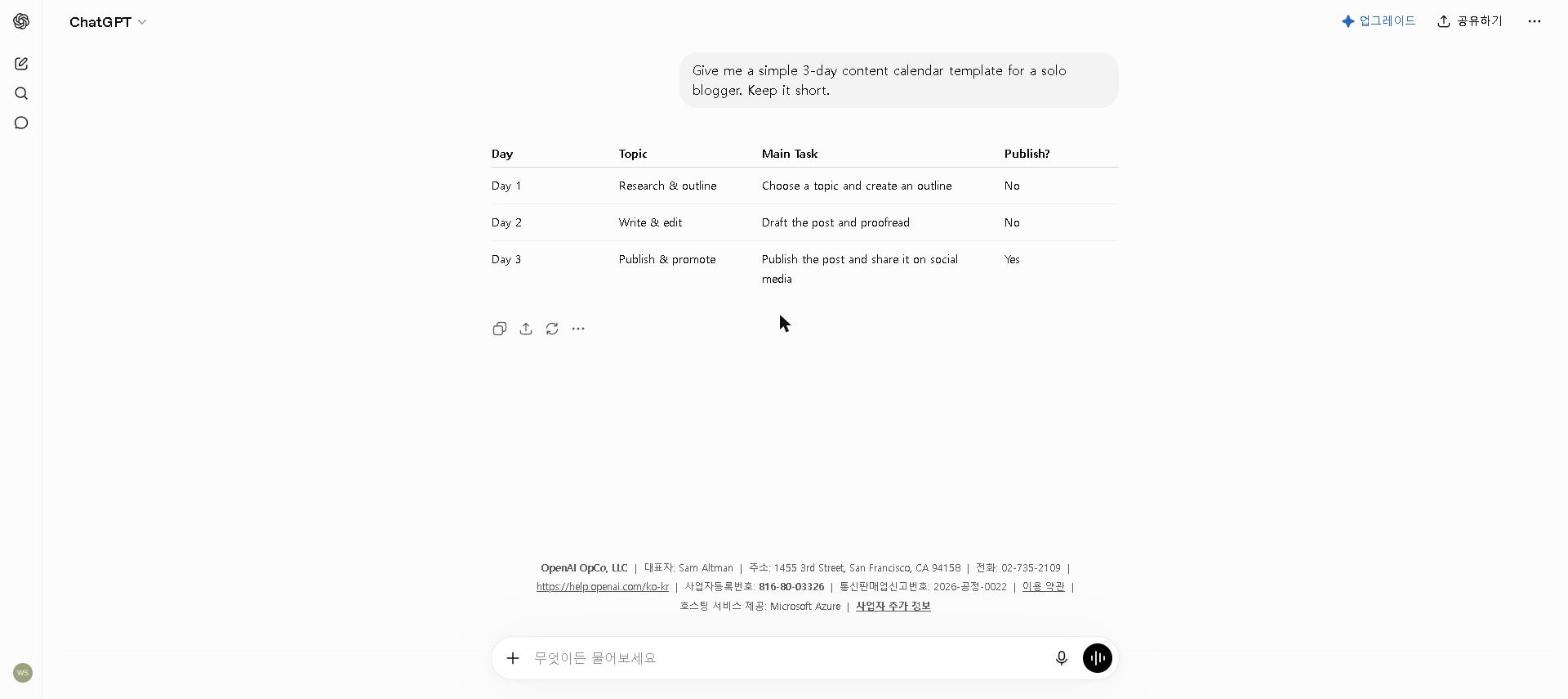
The problem it helps with: weekly planning is easy to keep postponing, and when it does happen it’s often unrealistic — underestimating how long things take and overestimating the hours available.
How to use it: Share your task list and upcoming meetings with ChatGPT and ask it to build a realistic weekly plan with prioritized tasks. It’s good at surfacing things you’ve mentally deprioritized that actually need attention, and at flagging when you’ve scheduled more than fits in the hours available.
What this looks like in practice: Sharing a task list alongside a realistic count of meeting hours lets ChatGPT calculate actual usable focused-work hours and flag when the task list doesn’t fit — surfacing which tasks genuinely need to happen this week versus which can move. Getting that clarity at the start of the week, rather than discovering the mismatch on Thursday, is the specific value of this step.
For tips on getting the most from ChatGPT’s free plan, check out our How to Use ChatGPT for Free in 2026 guide.
Pricing: Free / $20 per month (Plus)
Reclaim AI vs Motion: Which Is Better?
Both are excellent — but they serve different needs.
Reclaim AI is better if you want AI assistance while staying in control of your schedule. It works with your existing calendar rather than replacing your planning process entirely, and reviewers describe it as more adaptable to days where priorities shift unexpectedly.
Motion is better if you want full automation and trust the system to figure out your daily schedule without your involvement. If your workload is relatively predictable and you’re disciplined about adding tasks consistently, Motion’s approach produces a more optimized schedule than Reclaim AI.
Our recommendation: start with Reclaim AI. If you find yourself wishing it would just make more decisions for you, Motion (paid only, no free trial as of this writing) is the next thing to evaluate.
Common Mistakes
Trying to implement everything at once. Setting up Reclaim AI, Motion, Todoist, and RescueTime in the same week is a common mistake — each one requires habit formation, and starting all four simultaneously means none of them gets the runway to become automatic.
Treating time tracking as optional. Skipping RescueTime because you assume you already understand your time usage well enough is a common mistake — the first week of real data routinely proves that assumption wrong. Time tracking is worth adding early, not last.
Over-optimizing your schedule. Running Reclaim AI, Todoist, and a manual weekly planning routine all at once can end up taking more time to maintain than it saves. Simpler is usually better — two well-used tools beat five poorly-used ones.
Who This Is NOT For
Skip paid AI time management tools if you:
- Have a simple, consistent daily schedule with few competing priorities — free plans and basic calendar apps may be sufficient
- Are just starting a new role or project — establish your workflow manually before automating it
- Prefer full manual control over your schedule as a matter of personal preference
- Work in an environment where priorities shift so unpredictably that scheduling tools can’t keep up
Best AI Time Management Tools by Use Case
- Best AI tool for calendar scheduling: Reclaim AI
- Best AI tool for automatic daily planning: Motion
- Best AI tool for team scheduling: Reclaim AI (paid tier) — Clockwise shut down in March 2026
- Best free AI time management tool: Reclaim AI or Todoist AI
- Best AI tool for time tracking: RescueTime
- Best AI tool for task prioritization: Todoist AI or ChatGPT
- Best AI tool for focus and deep work: RescueTime
- Best AI tool for remote workers: Reclaim AI
Final Thoughts
The AI time management tools that tend to make a lasting difference are the ones that solve one specific, painful problem — not the ones with the most impressive feature lists. RescueTime solves the gap between how people think they’re spending their time and how they actually are. Reclaim AI solves the problem of a calendar controlled by everyone else’s priorities.
Start with one problem, find the tool that solves it, build the habit, and then identify the next problem. Trying to transform an entire time management system overnight rarely sticks.
Which AI time management tool has made the biggest difference in your workflow? Share in the comments — I genuinely enjoy comparing notes with others on what’s actually working.
Last updated: September 2026
Written by Ian Sung — IT professional working in automation, scripting and workflow tooling. ChatGPT, Claude and Google Gemini are part of my daily work; every other tool covered here is assessed from a free-plan check, official documentation and verified user reviews, and each review says which applies.
Pingback: My AI Productivity Stack in 2026 (What I Actually Use Every Day) | AI Tool Spot