TL;DR: Notion AI is worth it for existing Notion users who regularly take meeting notes, manage projects, and need AI that works inside their existing workflow. For non-Notion users, start with the free plans of ChatGPT or Claude first — they cover most writing needs without the added subscription cost.
Here’s an actual screenshot from a free-plan Notion workspace we set up to check the feature — not a mockup:
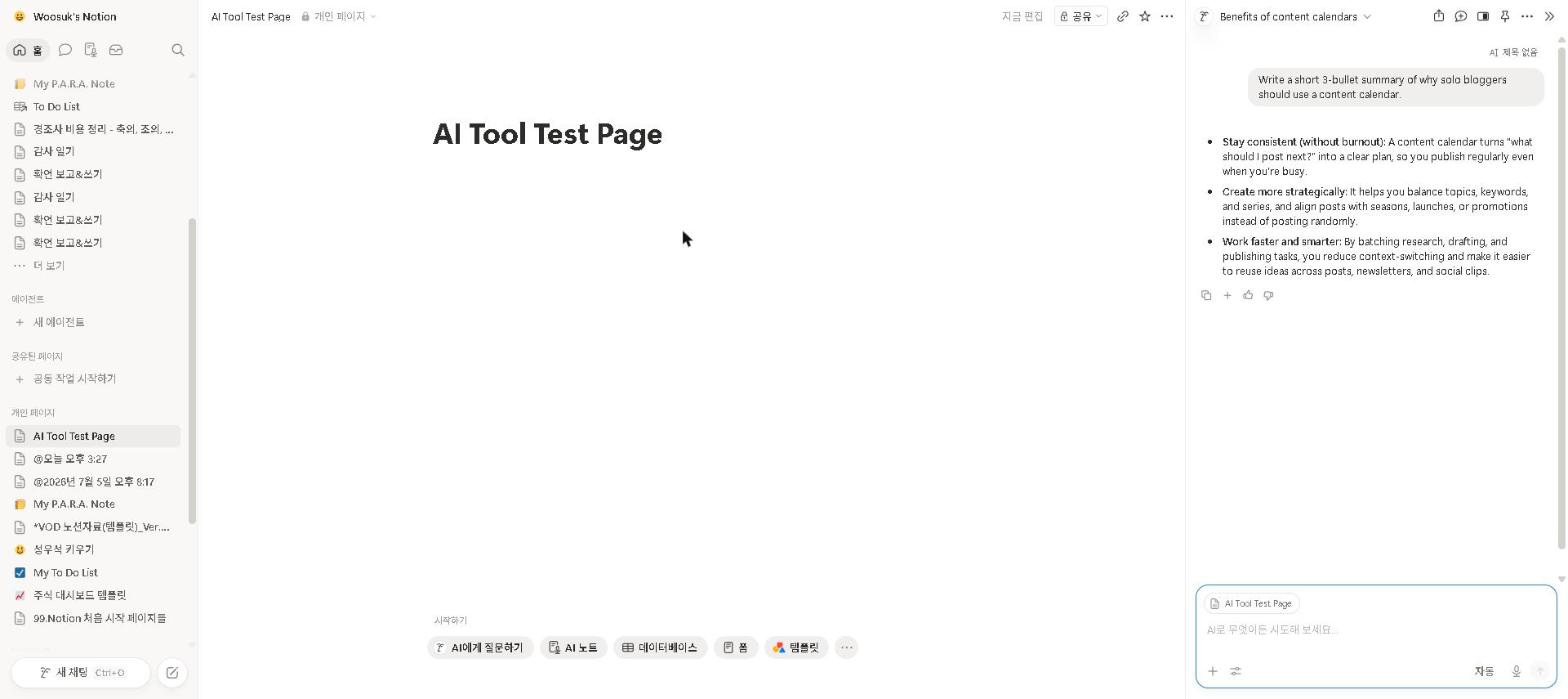
Notion AI review 2026 — here’s the honest take, from a free-plan check plus Notion’s documentation and a wide read of verified user reviews: Notion AI is one of the most seamlessly integrated AI tools available — but whether it’s worth paying for depends almost entirely on how you already work.
AI-powered productivity tools have become one of the fastest-growing software categories — and Notion AI’s approach of embedding AI directly into your existing workspace rather than requiring a separate app represents one of the most practical implementations available in 2026.
We checked Notion AI on a free-plan workspace rather than running it as a daily driver, so what follows leans on Notion’s own documentation and verified user reviews rather than months of our own use. The capability reviewers single out most is not the writing quality but the Q&A feature: being able to ask “what did we decide about X last month?” and get an accurate answer back from your own notes is the thing long-term users most often say changed how they work.
Should You Use Notion AI?
- Do you already use Notion as your primary workspace? → Yes — but full AI now means the Business plan at $20 per member
- Do you take long meeting notes that need summarizing? → Yes, Notion AI’s summarization is excellent
- Are you a new Notion user? → Start with the free plan first before adding AI
- Are you primarily a writer who needs content generation? → Claude or ChatGPT are better and cheaper
- Are you on a tight budget already paying for other AI tools? → Evaluate whether Notion AI adds enough value over what you already have
Quick Summary
| Feature | Rating |
|---|---|
| Writing Assistant | ⭐⭐⭐⭐ (4/5) |
| Summarization | ⭐⭐⭐⭐⭐ (5/5) |
| Q&A on Your Notes | ⭐⭐⭐⭐ (4/5) |
| Ease of Use | ⭐⭐⭐⭐⭐ (5/5) |
| Value for Money | ⭐⭐⭐ (3/5) |
| Overall | ⭐⭐⭐⭐ (4/5) |
Verdict: Notion AI is a genuinely useful tool — but only if you’re already a Notion user. If you’re not, there are better starting points.
What Is Notion AI?
Notion AI is an artificial intelligence layer built directly into Notion, the popular note-taking and project management app. Rather than being a standalone AI tool, it works within your existing Notion workspace — helping you write, edit, summarize, and organize your content without switching apps.
It was one of the first productivity apps to integrate AI deeply into its core experience, and in 2026, it remains one of the most polished AI productivity tools available.
Key Features
AI Writing Assistant
Notion AI can help you write blog posts, meeting notes, project briefs, emails, and more — all from within your Notion workspace. You highlight text, ask Notion AI to improve it, and it handles the rest.
Summarization
This is where Notion AI genuinely shines. You can paste in a long document, article, or set of meeting notes and ask Notion AI to summarize it in seconds. Verified user reviews consistently describe the summaries as accurate and well-structured.
Q&A on Your Workspace
One of Notion AI’s most impressive features is its ability to answer questions about your own notes and documents. Ask it “What did we decide in last week’s meeting?” and it will search your workspace and pull the relevant information.
Action Items Extraction
After a meeting or brainstorming session, Notion AI can automatically extract action items and to-dos from your notes — a feature reviewers frequently single out as a time-saver.
Translation
Notion AI supports translation into over 100 languages, making it useful for teams working across different regions.
Our Take: What Notion AI Does Well
Summarization is genuinely excellent. This is the feature verified reviewers praise most consistently: long documents and meeting notes come back as clean, accurate overviews in seconds. For anyone who regularly reads long reports or articles, this alone may justify the cost.
The integration with your workspace is seamless. Unlike standalone AI tools where you have to copy and paste content back and forth, Notion AI works directly on your existing notes. Long-term users often say this saves more time than it sounds, and that going back to a separate AI tool feels clunky afterwards.
It’s easy to use. There’s no learning curve. If you already use Notion, Notion AI feels like a natural extension of the app. You highlight text, press the AI button, and choose what you want to do.
Our Take: Where Notion AI Falls Short
The writing quality is good, but not great. For pure writing tasks, Claude or ChatGPT produce more natural, nuanced results. Notion AI is better thought of as a writing assistant — useful for improving and organizing your writing — rather than a replacement for a dedicated AI writing tool.
The price adds up. Notion AI is no longer a $10 add-on. Notion retired the standalone AI add-on in May 2025 and folded full AI into the Business plan at $20 per member per month; the Free and Plus plans now include only a capped AI trial. If you’re already paying for ChatGPT Plus or Claude Pro, adding Notion AI to your stack starts to feel expensive for what it offers.
It struggles with complex instructions. Reviewers report that with detailed, multi-step instructions it occasionally missed parts of the request or produced generic results. For straightforward tasks it’s excellent — for complex ones, it’s hit or miss.
Notion AI Pricing
| Plan | Price | What’s Included |
|---|---|---|
| Notion Free | Free | Basic Notion features, limited AI |
| Notion Plus | $10/month | More blocks, unlimited pages |
| Notion AI Add-on | In Business ($20/user) | Full AI features (Business plan and above) |
| Notion Business | $20/month | Everything combined |
Our recommendation: If you want to try Notion AI, start with the capped AI trial on the free plan; full AI now requires the Business plan at $20 per member per month. If you find yourself using it daily, the Business plan ($20 per member per month) is the tier that includes it.
Who Should Use Notion AI?
Notion AI is a great fit if you:
- Already use Notion as your primary workspace
- Regularly take long meeting notes that need summarizing
- Work in a team and need to organize shared information
- Want AI that works inside your existing workflow
Notion AI is NOT a great fit if you:
- Don’t already use Notion (start with a free AI tool first)
- Need advanced AI writing capabilities (Claude or ChatGPT are better)
- Are on a tight budget (the price adds up quickly)
- Mainly need AI for tasks outside of note-taking and organization
Notion AI vs. Alternatives
| Tool | Best For | Price |
|---|---|---|
| Notion AI | Note-taking & organization | In Business ($20/user) add-on |
| ChatGPT | General writing & coding | Free / $20/month |
| Claude | Long-form writing | Free / $20/month |
| Obsidian + AI | Privacy-focused note-taking | Free / varies |
For a detailed comparison of ChatGPT and Claude at the same price point, check out our ChatGPT vs Claude 2026 guide. For students looking for free alternatives, see our Best Free AI Tools for Students in 2026 guide.
Are AI Writing Tools Worth It in 2026?
Is Notion AI worth it? For existing Notion users, yes — especially if summarization and Q&A on your own notes are useful for your workflow. Whether the Business plan’s $20 per member is reasonable depends on how much of your work already lives in Notion.
For non-Notion users, we’d recommend starting with the free versions of ChatGPT or Claude before committing to a paid Notion Business subscription.
The bottom line: Notion AI is one of the most polished AI productivity tools available in 2026. It won’t replace a dedicated AI writing tool, but as a complement to your existing Notion workflow, it’s genuinely useful.
Who This Is NOT For
Skip Notion AI if you:
- Don’t already use Notion — there’s no reason to adopt both a new workspace app and its AI add-on simultaneously
- Primarily need AI for long-form writing — Claude produces significantly better results for this use case at the same price
- Are already paying for ChatGPT Plus or Claude Pro — evaluate whether Notion AI adds enough marginal value
- Only use Notion occasionally for simple note-taking — the AI add-on won’t pay off at low usage volume
Final Thoughts
Notion AI has matured significantly since its launch. The summarization and Q&A features are genuinely impressive, and the seamless integration with your workspace makes it one of the most convenient AI tools available.
If you’re a Notion user, start with the capped AI trial on the free plan and see how often you actually reach for it. If it becomes part of your daily workflow, the Business plan is worth pricing out.
Have you tried Notion AI? Share your experience in the comments below!
Last updated: September 2026
Written by Ian Sung — IT professional working in automation, scripting and workflow tooling. ChatGPT, Claude and Google Gemini are part of my daily work; every other tool covered here is assessed from a free-plan check, official documentation and verified user reviews, and each review says which applies.
Pingback: Stop Wasting Time: Best AI Tools for Student Productivity in 2026 | AI Tool Spot
Pingback: Best AI Tools for Productivity in 2026 | The AI Tool Spot
Pingback: Best AI Tools for Managers in 2026 (What Actually Works) | AI Tool Spot
Pingback: Best AI Tools for Remote Workers in 2026 | AI Tool Spot
Pingback: How to Use AI to Study for Exams in 2026 (Student Guide) | AI Tool Spot
Pingback: Best AI Tools for Small Businesses in 2026 (Tested & Reviewed) | AI Tool Spot
Pingback: How I Use AI Tools Every Day to Save 3 Hours (My Real Workflow in 2026) | AI Tool Spot
Pingback: My AI Productivity Stack in 2026 (What I Actually Use Every Day) | AI Tool Spot