AI coding tools have fundamentally changed what’s possible in software development — and in 2026, they’ve become essential for anyone who writes code regularly. Whether you’re a seasoned developer looking to work faster or a complete beginner trying to learn, the best AI coding tools can cut your development time significantly.
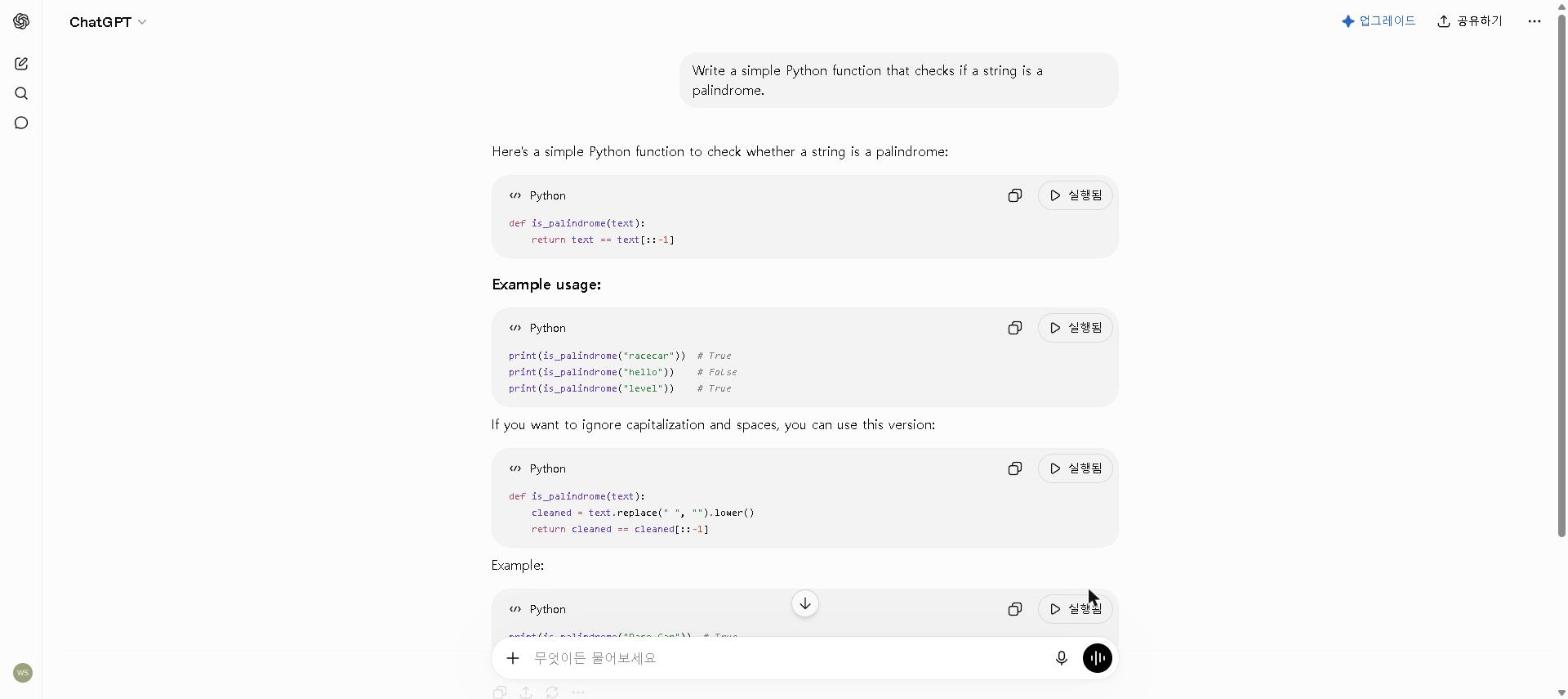
Here’s ChatGPT actually writing code, from my own testing session:
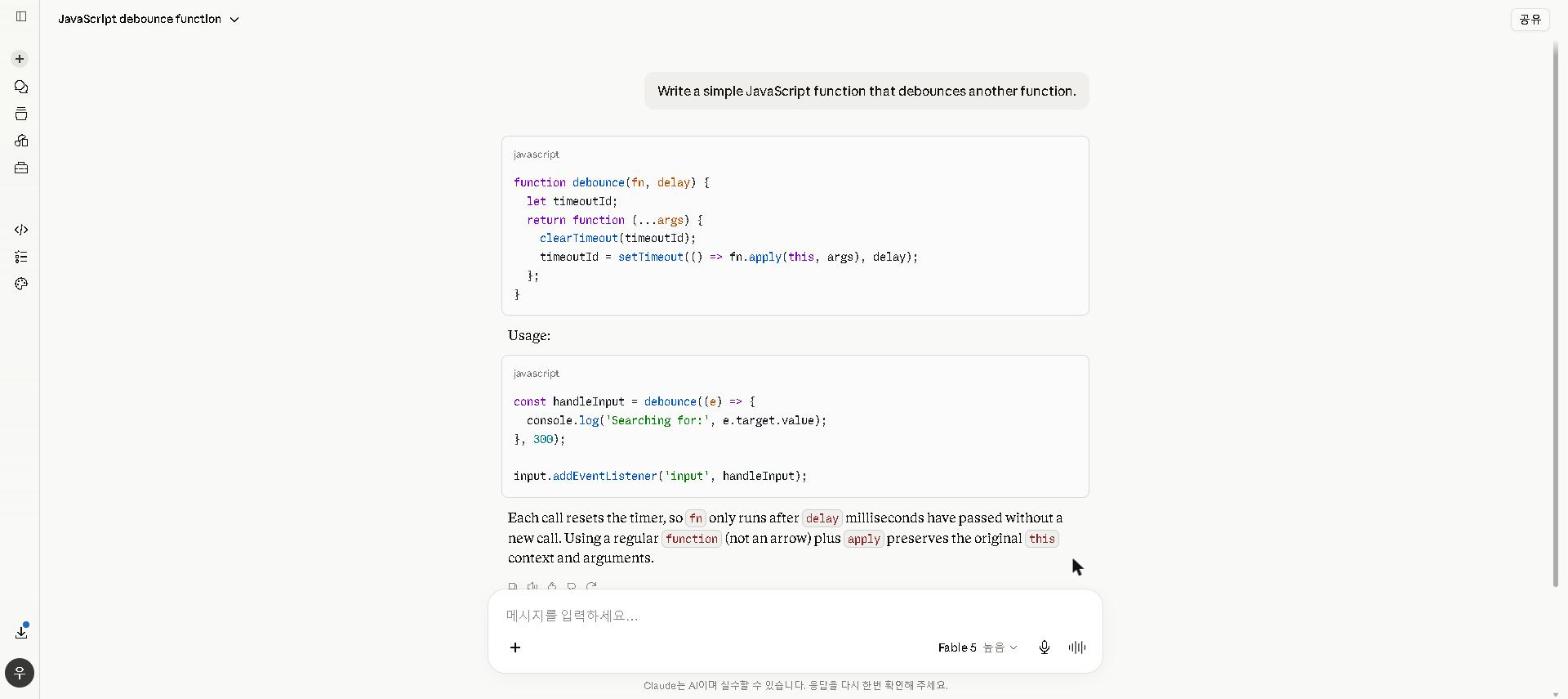
And here’s Claude, tested with a real coding request:
GitHub’s controlled study of Copilot put the gap at 55%: the same task took 1 hour 11 minutes with the assistant and 2 hours 41 minutes without it.
If you only care about the short answer: GitHub Copilot is the best for everyday coding assistance, Claude is the best for complex projects, and Replit AI is the best for beginners. But the full picture depends on how you work — and most serious developers end up using more than one.
Several of these tools offer strong free plans — so you don’t need a budget to get started.
Quick Comparison Table
| Tool | Best For | Free Plan | Starting Price |
|---|---|---|---|
| GitHub Copilot | Everyday coding assistance | ✅ Yes | $10/month |
| Claude | Complex code & long projects | ✅ Yes | $20/month |
| ChatGPT | General coding & debugging | ✅ Yes | $20/month |
| Cursor | AI-native code editor | ✅ Yes | $20/month |
| Replit AI | Beginners & browser coding | ✅ Yes | $20/mo (Core, annual) |
| Tabnine | Privacy-focused autocomplete | ✅ Yes | $39/user/mo |
Bottom line: GitHub Copilot and Cursor lead for everyday development. Claude wins for complex, multi-file projects. If you’re serious about coding productivity in 2026, you’ll likely end up using two or more of these tools together.
Best AI Coding Tools: Key Differences at a Glance
- Best for everyday coding: GitHub Copilot
- Best for complex projects: Claude + Claude Code
- Best for beginners: Replit AI
- Best AI-native editor: Cursor
- Best for debugging: ChatGPT
- Best for privacy: Tabnine
- Best free AI coding tool: GitHub Copilot or ChatGPT
👉 Try the free plans of GitHub Copilot and ChatGPT today — together they cover most everyday coding needs without spending anything.
1. GitHub Copilot — Best for Everyday Coding Assistance
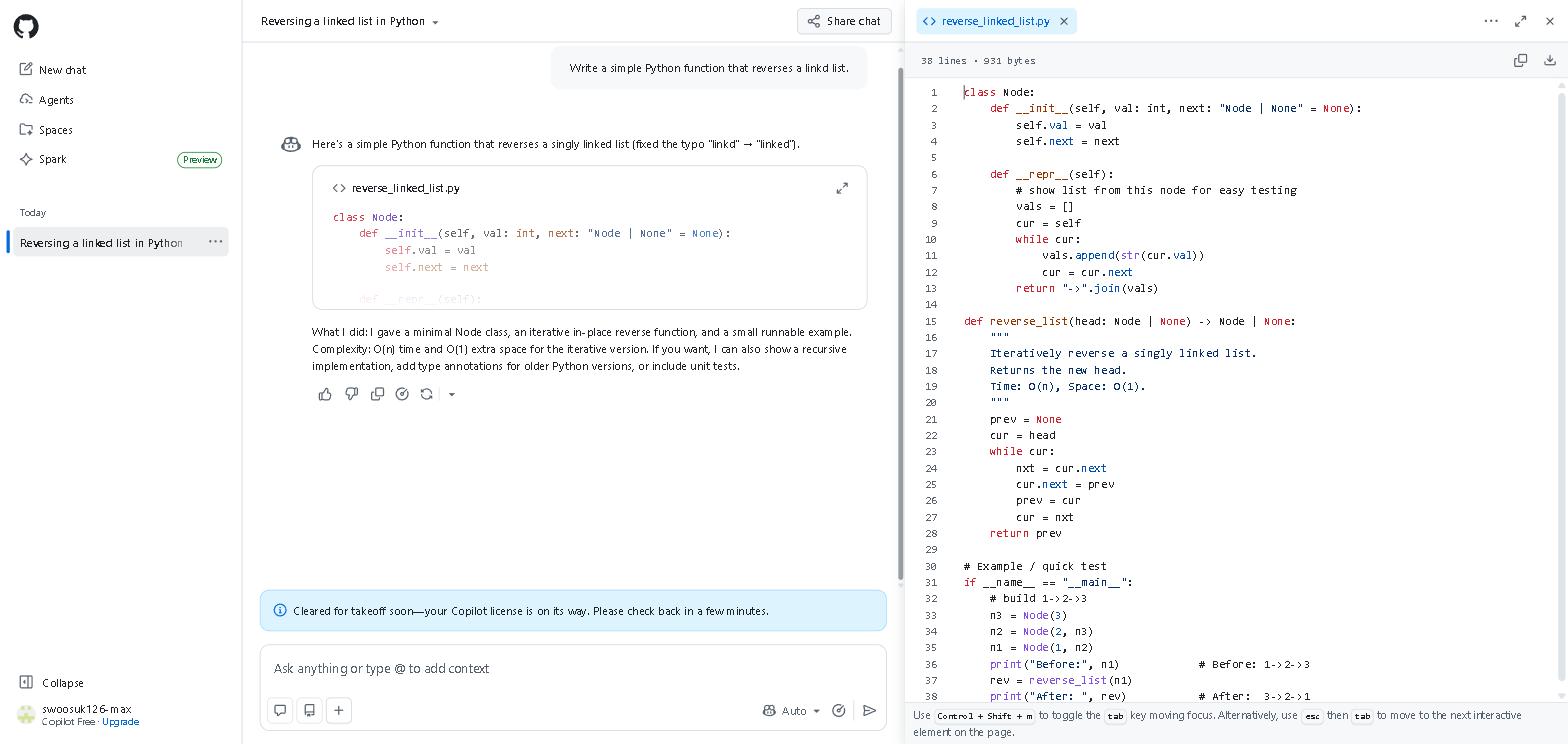
Here’s GitHub Copilot in action, on a free-plan account we set up to check it:
Why it’s essential for developers: GitHub Copilot is the most widely adopted AI coding tool in the world — because it works inside your existing editor without disrupting your workflow.
Best for: Real-time code suggestions, autocomplete, and everyday development tasks
GitHub Copilot integrates directly into VS Code, JetBrains, and other popular editors, providing real-time code suggestions as you type. For developers who want AI assistance without changing their workflow, it’s the most practical option available.
For a broader look at how AI tools are changing software development, check out our Best AI Tools for Productivity in 2026 guide.
Key Features
- Real-time code suggestions and autocomplete
- Works inside VS Code, JetBrains, Neovim, and more
- Copilot Chat for asking coding questions in plain English
- Multi-file context awareness
- Supports virtually every programming language
- Free plan available for individual developers
Our Take
We’ve only checked GitHub Copilot on a free-plan account (the screenshot above), so this leans on GitHub’s documentation, its controlled study and verified user reviews. Its strength is repetitive structure — unit tests, boilerplate, similar functions — where autocomplete suggestions do most of the typing. Copilot Chat is the other standout: highlight a function, ask “what does this do?”, and get a plain-English explanation, which is especially valuable in legacy or unfamiliar codebases.
👉 Install GitHub Copilot’s free plan today — within your first coding session, you’ll see exactly why it’s the most widely used AI coding tool in the world.
Pricing: Free (limited) / $10 per month (Individual)
2. Claude — Best for Complex Code and Long Projects
Why it’s essential for developers: Claude’s large context window allows it to hold entire codebases in memory — making it uniquely useful for complex, multi-file projects where other tools lose track of the bigger picture.
Best for: Writing complex code, understanding large codebases, and detailed technical explanations
Claude has become one of the most capable AI tools for serious coding work in 2026. Its large context window allows it to handle entire codebases in context — making it uniquely useful for complex, multi-file projects where other tools lose track of the bigger picture.
For a detailed look at Claude’s full capabilities beyond coding, check out our Claude AI Review 2026.
Key Features
- Very large context window — handles entire codebases
- Excellent at writing complex, well-structured code
- Detailed technical explanations and documentation
- Strong at debugging multi-step logic errors
- Claude Code for terminal-based agentic coding (Pro)
Our Take
Claude’s advantage shows up in work that needs the whole picture — restructuring a function with several dependencies, for example, where the change has to account for how it interacts with the rest of the codebase. It tends to produce clean, well-commented code and to explain its reasoning, which is why it suits work where correctness matters more than raw speed. For substantial projects, it’s among the most reliable AI coding tools available.
👉 If you’re working on a complex project today, paste your most problematic function into Claude — the quality of the analysis will show you immediately why serious developers swear by it.
Pricing: Free / $20 per month (Pro)
3. ChatGPT — Best for General Coding and Debugging
Why it’s essential for developers: ChatGPT’s conversational interface makes it the fastest tool for debugging, explaining errors, and learning new languages — tasks that come up every single day in development.
Best for: Debugging, explaining code, learning new languages, and general coding tasks
ChatGPT remains one of the most versatile AI coding tools available. Its conversational interface makes it easy to ask coding questions in plain English, get explanations of unfamiliar concepts, and work through bugs step by step.
Key Features
- Explains code in plain English at any skill level
- Strong debugging capabilities across all major languages
- Helps learn new programming languages and frameworks
- Generates boilerplate code and templates quickly
- File upload for analyzing existing code (Plus)
Our Take
Debugging is where ChatGPT earns its place: paste in a cryptic error message with the relevant code and it will usually explain the root cause and suggest a fix far faster than digging through documentation. For developers learning a new framework or language, its ability to explain concepts at the right level of detail makes it one of the most valuable free coding tools available.
👉 Next time you hit a bug you can’t explain, paste it into ChatGPT’s free plan — you’ll solve it faster than any Stack Overflow search.
Pricing: Free / $20 per month (Plus)
4. Cursor — Best AI-Native Code Editor
Why it’s essential for developers: Cursor is the only major code editor built from the ground up with AI at its core — and the difference in AI integration depth shows immediately.
Best for: Developers who want deep AI integration throughout their entire coding workflow
Cursor is a code editor built from the ground up with AI at its core. Unlike GitHub Copilot, which adds AI features to existing editors, Cursor is designed so that AI is central to every aspect of the coding experience — from writing and editing to understanding and refactoring entire codebases.
Key Features
- AI-powered code generation, editing, and refactoring
- Codebase-aware chat — ask questions about your entire project
- Composer mode for generating multi-file changes at once
- Built on VS Code — familiar interface for existing users
- Supports all major programming languages and frameworks
Our Take
We haven’t used Cursor ourselves; this is based on its official documentation and verified user reviews. The feature reviewers single out is Composer: describe a change, and Cursor plans and applies it across multiple files in one coordinated pass, with an explanation of what it changed and why. That multi-file coordination is what developers most often say they miss when they go back to a plugin-style assistant. For developers willing to switch editors, it’s the most ambitious take on AI-assisted coding available.
👉 Download Cursor’s free plan and try the Composer feature on your next multi-file change — that’s the feature reviewers say sets it apart.
Pricing: Free (limited) / $20 per month (Pro)
5. Replit AI — Best for Beginners and Browser-Based Coding
Why it’s essential for beginners: The biggest barrier to learning coding isn’t the concepts — it’s the setup. Replit AI eliminates that barrier entirely by running everything in the browser.
Best for: Beginners, students, and anyone who wants to code without setting up a local environment
Replit is a browser-based coding environment with built-in AI assistance — making it the most accessible entry point into AI-assisted coding for beginners and students. No installation required, no environment setup — just open a browser and start coding.
Key Features
- Fully browser-based — no installation needed
- AI code generation, explanation, and debugging
- Supports 50+ programming languages
- Built-in hosting for web projects
- Collaborative coding features for teams and classrooms
Our Take
We haven’t used Replit AI ourselves; this is based on its documentation and verified user reviews. Its appeal for beginners is that everything runs in the browser — the AI generates starter code, explains what each part does and helps fix errors as they appear, with no local environment to set up. For anyone just starting out, that removes the friction point that stops many beginners before they write a line of code.
👉 If you’ve been putting off learning to code because setup feels overwhelming, open Replit AI today — there’s nothing to install before you write your first line.
Pricing: Free / $20 per month (Core, annual billing)
6. Tabnine — Best for Privacy-Focused Developers
Why it’s essential for enterprise teams: For developers working with sensitive codebases or in regulated industries, sending code to external servers is simply not an option. Tabnine is the only major AI coding tool that solves this problem completely.
Best for: Developers who need AI coding assistance without sending code to external servers
Tabnine takes a different approach from most AI coding tools — it prioritizes privacy and security by offering options to run entirely on your local machine or on your organization’s private servers.
Key Features
- Local AI model option — code never leaves your machine
- Enterprise deployment on private servers
- Integrates with VS Code, JetBrains, and more
- Trained on permissively licensed code only
- Strong autocomplete across all major languages
Our Take
We haven’t used Tabnine ourselves; this is based on its official documentation and verified user reviews. Its reason to exist is privacy: a local or self-hosted model means code never leaves your machine or your organization’s servers. Reviewers describe the autocomplete as solid for routine work rather than best-in-class. For individual developers on personal or open-source projects, GitHub Copilot or Cursor are usually better choices; for teams with strict security or compliance requirements, Tabnine is the most practical option.
👉 If your company has data security policies that prevent sending code to external servers, Tabnine’s local model is the solution — set it up today.
Pricing: From $39 per user per month
GitHub Copilot vs Cursor: Which Is Better?
Both GitHub Copilot and Cursor are excellent AI coding tools — but they serve meaningfully different needs in our ChatGPT vs Claude style comparison of coding tools.
GitHub Copilot is better for developers who want AI assistance within their existing workflow. It integrates seamlessly into VS Code and JetBrains without requiring any changes to how you work — making it the lowest-friction option for adding AI to your coding process today.
Cursor is better for developers who want to fully embrace AI as the center of their workflow. Its Composer feature, codebase-wide context, and multi-file editing capabilities go significantly beyond what Copilot offers — but require switching to a new editor.
If you want AI assistance with minimal disruption, start with GitHub Copilot. If you’re ready to rebuild your workflow around AI and want the most powerful tool available, Cursor is the stronger choice.
👉 Try both free plans — GitHub Copilot in your current editor, and Cursor for a week alongside it.
Who This Is NOT For
AI coding tools are genuinely useful for most developers — but they’re not the right fit for everyone.
Skip this toolkit if you:
- Are learning programming fundamentals for the first time — master the basics before relying on AI suggestions, or you’ll struggle to understand what the AI is generating
- Work in a highly regulated environment where no external AI tools are permitted — check your organization’s policy before installing anything
- Write only occasional scripts or simple automation — the setup time won’t be worth it at very low volume
- Prefer to solve problems entirely independently as a learning method — AI coding tools can short-circuit the productive struggle that builds real programming intuition
For everyone else — especially developers who write code daily and want to ship faster without sacrificing quality — the tools on this list are worth adding to your workflow today.
Best AI Coding Tools by Use Case
- Best AI coding tool overall: GitHub Copilot or Cursor
- Best free AI coding tool: GitHub Copilot or ChatGPT
- Best AI coding tool for beginners: Replit AI
- Best AI coding tool for complex projects: Claude + Claude Code
- Best AI coding tool for debugging: ChatGPT or Claude
- Best AI coding tool for privacy: Tabnine
- Best AI coding tool for teams: GitHub Copilot or Tabnine
- Best AI-native code editor: Cursor
- Best AI coding tool for learning: Replit AI or ChatGPT
The Smartest Approach: Use More Than One
The most productive developers in 2026 don’t use a single AI coding tool — they use a complementary stack that covers different parts of the workflow.
A combination that covers most of the workflow:
- GitHub Copilot — for real-time autocomplete during everyday coding
- Claude — for complex refactoring and understanding large codebases
- ChatGPT — for debugging and quick explanations
- Cursor — when working on projects that benefit from multi-file AI coordination
At $0 combined for the free plans of GitHub Copilot, Claude, and ChatGPT, there’s no reason not to try all three this week.
Are AI Coding Tools Worth It in 2026?
For anyone who writes code regularly, the answer is an unambiguous yes.
The time savings are real. GitHub’s controlled study found developers finished a task 55% faster with Copilot, and the gains concentrate in repetitive work — boilerplate, tests, documentation and common errors.
The learning acceleration is real. For beginners, AI coding tools have fundamentally changed the learning curve. Being able to ask “why isn’t this working?” and get a specific, accurate answer in seconds — rather than spending hours reading documentation — accelerates skill development in a way that wasn’t possible before 2023.
The free plans cover most needs. GitHub Copilot, ChatGPT, Claude, Cursor, and Replit all offer meaningful free plans. Most developers can get significant value from AI coding tools without spending anything.
But they’re not a replacement for understanding. The biggest risk with AI coding tools is over-reliance. AI can generate code that looks correct but contains subtle bugs or security vulnerabilities. The best approach is to use AI to accelerate your work while maintaining a clear understanding of what the code is actually doing — especially for anything that will go into production.
Final Thoughts
AI coding tools have transformed software development in 2026. Whether you’re a seasoned developer looking to move faster or a complete beginner trying to get started, there’s a tool on this list that fits your needs and budget.
Start with GitHub Copilot’s free plan for everyday coding assistance and ChatGPT’s free plan for debugging and explanations — together they cover most coding needs at no cost. Add Claude for complex projects and Cursor when you’re ready to take AI-assisted coding to the next level.
Have you used any of these AI coding tools? Share your experience in the comments below!
Last updated: September 2026
Written by Ian Sung — IT professional working in automation, scripting and workflow tooling. ChatGPT, Claude and Google Gemini are part of my daily work; every other tool covered here is assessed from a free-plan check, official documentation and verified user reviews, and each review says which applies.
Pingback: ChatGPT vs Claude: Which AI Is Better in 2026? | AI Tool Spot
Pingback: Claude AI Review 2026: Is It Worth It? | AI Tool Spot
Pingback: GitHub Copilot Review 2026: Is It Worth It? (Honest Review) | AI Tool Spot
Pingback: Perplexity AI vs ChatGPT: Which Is Better in 2026? | AI Tool Spot