Canva AI review 2026 — the reason most people end up on Canva is inertia rather than a decision. It is familiar, it works well enough, and switching to something else feels like unnecessary effort. The question this review answers is whether the AI features give you a better reason than that.
Here’s a real result from Canva’s AI design generator, on a free-plan account we set up to check it:
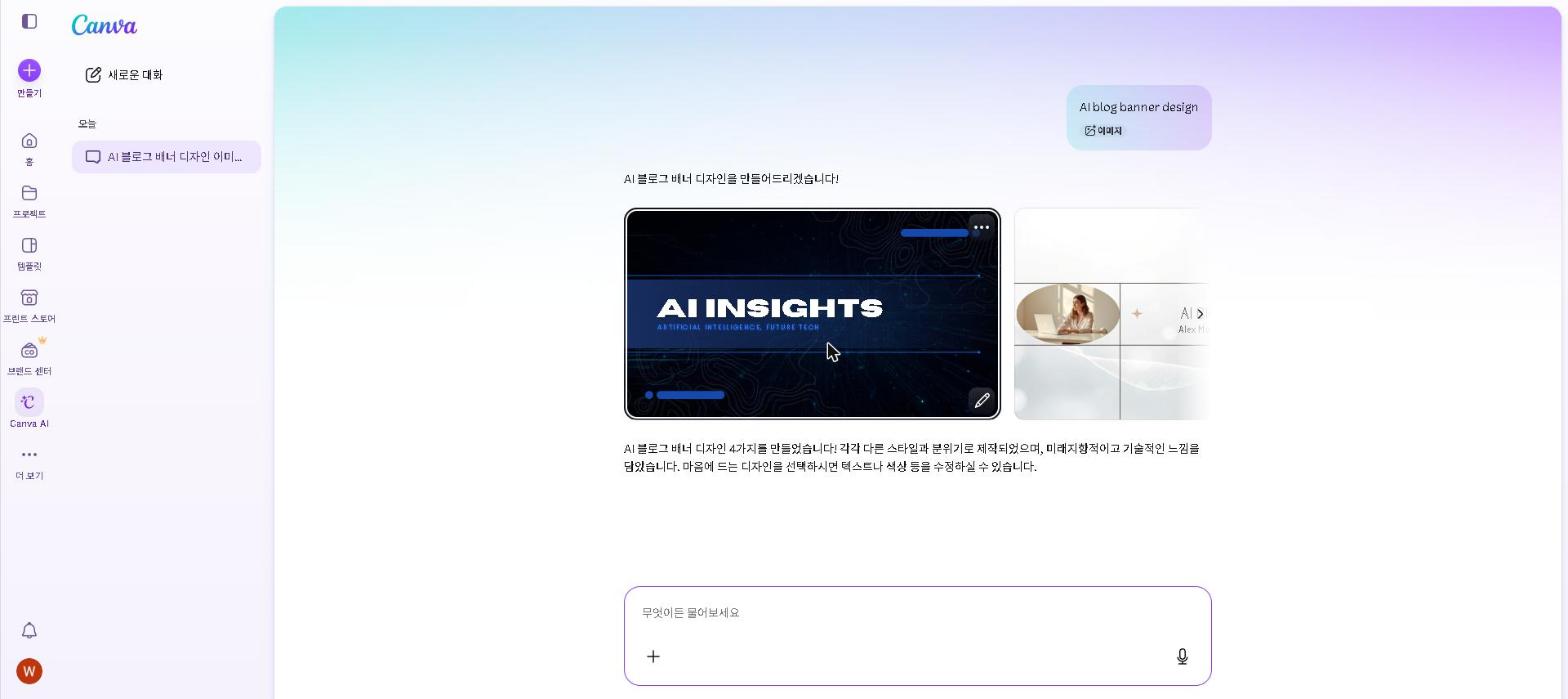
The feature that changes the case for it is Magic Media: describe the image you need and it’s generated in under a minute, directly inside the design canvas you’re already working in — no switching apps, no importing files, no stock-photo licensing to check.
That workflow change is what turns Canva from a tool people use reluctantly into one they open daily — it is the single shift that comes up most in verified user reviews.
We checked Canva AI on the free plan for the one use case we can speak to directly — blog featured images — and took the rest, including how the Pro tier behaves across social content, proposal decks and marketing material, from Canva’s documentation and verified user reviews. Here is what that adds up to.
If you only care about the short answer: start with the free plan. For most users, it covers everything they need. Upgrade to Pro when you need Brand Kit and unlimited background removal.
Should You Use Canva AI?
- Do you create social media graphics regularly? → Yes, Canva AI is the most efficient tool available
- Do you need professional-looking proposals or presentations? → Yes, the template library covers every format
- Are you a blogger who needs featured images? → Yes, AI generation plus templates beats stock photo sites
- Do you have zero design skills? → Yes, Canva AI is specifically built for you
- Do you need high-quality artistic images? → Consider Midjourney alongside Canva — check our Midjourney Review 2026
- Are you a professional graphic designer? → Canva AI complements but doesn’t replace advanced tools
Quick Summary
| Feature | Rating |
|---|---|
| AI Image Generation | ⭐⭐⭐⭐ (4/5) |
| Design Templates | ⭐⭐⭐⭐⭐ (5/5) |
| Ease of Use | ⭐⭐⭐⭐⭐ (5/5) |
| Free Plan Value | ⭐⭐⭐⭐⭐ (5/5) |
| Pro Plan Value | ⭐⭐⭐⭐⭐ (5/5) |
| Overall | ⭐⭐⭐⭐½ (4.5/5) |
Verdict: Canva AI is the most accessible and practical AI design tool available in 2026. Its combination of AI features, templates, and ease of use makes it essential for anyone who creates visual content regularly — without requiring design skills or a significant budget.
What Is Canva AI?
Canva AI refers to the suite of AI-powered features built into Canva — the world’s most popular online design platform with over 170 million users. In 2026, Canva has significantly expanded its AI capabilities beyond basic design assistance to include full AI image generation, video creation, presentation building, and content writing — all within the same familiar drag-and-drop interface.
Unlike standalone AI image generators like Midjourney or DALL-E, Canva AI is integrated directly into a complete design workflow — making it uniquely practical for users who need to go from idea to finished, publishable design as quickly as possible.
Key Features
Magic Media — AI Image Generation
Canva’s AI image generation generates images directly within the design canvas from a text prompt. Type what you need, choose a style, and the image appears ready to drop into your design — without switching apps or importing files.
Magic Edit — AI Image Editing
Magic Edit allows you to modify existing images using text prompts. Select a part of an image, describe what you want to change, and Canva AI makes the edit. For bloggers and marketers who need to customize stock photos or AI-generated images, this saves significant time compared to traditional editing tools.
Magic Write — AI Copywriting
Magic Write generates headlines, social media captions, presentation copy, and marketing text directly within your design — without switching to a separate AI writing tool. For longer content, Claude and ChatGPT produce better results — check our Best AI Writing Tools in 2026 guide.
Background Remover
Removes image backgrounds with a single click. For product photos, profile pictures, and marketing materials, this feature alone saves hours of manual editing.
Magic Presentation
Generates entire presentation structures from a single text prompt — complete with slide layouts, placeholder text, and design themes. Useful for anyone who builds presentations regularly.
Brand Kit
Stores your brand colors, fonts, and logos — and Canva AI applies them consistently across all your designs. For freelancers managing multiple client brands or businesses maintaining visual consistency, this is genuinely valuable.
My Take: What Canva AI Does Well
The integrated workflow is what makes it different. The most valuable thing about Canva AI is not any single feature — it is that image generation, editing and design all happen in the same place. The conventional featured-image workflow means stock photo sites, a separate image editor and multiple browser tabs; here it is one tab and one tool. That consolidation, rather than the raw quality of the generated images, is what users consistently point to as the reason they stay.
The template library is genuinely excellent. It’s deep enough that most people rarely need to design from scratch, and the AI features make templates more flexible — replacing a placeholder image with one generated to match your content makes the output feel custom rather than templated.
Magic Edit solves a common workaround. When a photo is almost right but has an element you don’t want — a logo in the background, a clashing colour, a slightly off composition — you can select it and describe the change instead of hunting for a different photo. Reviewers describe it as not perfect, but good enough to be practically useful most of the time.
The free plan is more capable than most people expect. On our own free-plan check the first limit we ran into was background removal; templates, the basic AI features and image generation were all available without paying, which matches what Canva documents for the tier. For anyone uncertain about whether Canva AI will fit their workflow, the free plan gives you a genuine evaluation period before any question of upgrading comes up.
My Take: Where Canva AI Falls Short
Image quality is good but not Midjourney-level. Reviewers who need a specific, high-quality artistic result generally create it in a dedicated tool like Midjourney and import it; Canva’s built-in generation suits functional images better — a background, a simple illustration, a generic visual. For a full comparison of image generation quality, see our Best AI Image Generators in 2026 guide and our Midjourney Review 2026.
Magic Write is a starting point, not a finished product. For quick captions and short copy, it’s useful. For anything longer or more nuanced, Claude or ChatGPT produce noticeably better results. Treat it as a first draft for captions and edit from there — not as the primary writing tool for anything that matters.
The price adds up for teams. At $18/month ($15 on annual billing) it’s reasonable for individuals, but per-seat costs add up across a team — at which point comparing against dedicated design tools or a Figma subscription is worth doing.
Canva AI Pricing
| Plan | Price | What’s Included |
|---|---|---|
| Free | Free | 250,000+ templates, basic AI features, 5GB storage |
| Pro | $18/mo ($15 annual) | Full AI features, Brand Kit, background remover, 1TB storage |
| Teams | $10/month per user | Everything in Pro plus team collaboration features |
Our recommendation: Start with the free plan — it covers most everyday design needs and gives you a genuine sense of whether Canva AI fits your workflow. The two things reviewers most often name as the reason they upgraded are the Brand Kit and unlimited background removal; if neither is a bottleneck for you, the free plan is where to stay.
Canva AI vs Alternatives
| Tool | Best For | Design Templates | Price |
|---|---|---|---|
| Canva AI | All-round visual content | ✅ 250,000+ | Free / $18 mo ($15 annual) |
| Adobe Express | Adobe ecosystem users | ✅ Yes | Free / $9.99/month |
| Midjourney | Artistic image generation | ❌ No | $10/month |
| DALL-E 3 (ChatGPT) | Photorealistic images | ❌ No | Free / $20/month |
For bloggers and content creators, Canva AI is the most practical choice — the combination of AI generation and design templates in one tool is uniquely efficient. For pure image generation quality, Midjourney is better. For a breakdown of all image generation options, see our Best AI Image Generators in 2026 guide.
Who This Is NOT For
Skip Canva AI if you:
- Are a professional graphic designer who needs advanced vector editing — use Adobe Illustrator or Figma instead
- Primarily need high-quality artistic image generation — Midjourney produces better results for this specific use case
- Need advanced photo editing capabilities — Adobe Photoshop is the stronger choice
- Work exclusively in print design with specific CMYK color requirements
- Only create visual content once or twice per month — free plans of any tool cover very low-volume needs
Frequently Asked Questions
Is Canva AI free?
Yes — Canva has a genuinely capable free plan that includes 250,000+ templates and basic AI features. The Pro plan at $18/month ($15 on annual billing) unlocks the full AI feature set including unlimited background removal and the Brand Kit.
Is Canva AI better than Midjourney?
For complete design workflows — combining images with templates, text, and branding — Canva AI is more practical. For pure image generation quality, Midjourney produces more impressive results. Check our Midjourney Review 2026 for a full comparison.
Is Canva Pro worth it?
For users who create visual content regularly and need Brand Kit or unlimited background removal — yes. For casual users, the free plan covers most everyday needs. The background removal limit is the one people report hitting first, and it is usually what decides the upgrade.
Is Canva AI good for small businesses?
Yes — particularly for social media management, marketing materials, and client presentations. For a full look at AI tools for small businesses, check out our Best AI Tools for Small Businesses in 2026 guide.
Does Canva AI work for bloggers?
Yes — it’s one of the most practical tools for bloggers who need featured images and social media graphics without design skills or a stock photo budget. The integrated image generation and design workflow is one of the most efficient options for this use case.
Final Thoughts
Canva AI’s case rests on the integrated workflow — image generation, editing and design in one place — and that consolidation is what verified users most consistently credit it with.
Start with the free plan and use it on your next three design projects. For most content creators and marketers, those three projects will tell you whether upgrading to Pro makes sense.
What Canva AI feature has made the biggest difference in your workflow? Share in the comments — especially any Magic Edit uses worth knowing about.
Last updated: September 2026
Written by Ian Sung — IT professional working in automation, scripting and workflow tooling. ChatGPT, Claude and Google Gemini are part of my daily work; every other tool covered here is assessed from a free-plan check, official documentation and verified user reviews, and each review says which applies.
Pingback: How to Use AI for Social Media in 2026 (Complete Guide) | AI Tool Spot
Pingback: Midjourney Review 2026: Is It Worth It? (Honest Review) | AI Tool Spot
Pingback: Best AI Image Generators in 2026 (Free & Paid) | AI Tool Spot
Pingback: Best AI Tools for Small Businesses in 2026 (Tested & Reviewed) | AI Tool Spot
Pingback: Best AI Tools for Entrepreneurs in 2026 (Tested & Reviewed) | AI Tool Spot
Pingback: Best AI Tools for Content Creators in 2026 (Tested & Reviewed) | AI Tool Spot
Pingback: Best Free AI Tools for Students in 2026 | AI Tool Spot
Pingback: Best AI Tools for Freelancers in 2026 | AI Tool Spot
Pingback: My AI Productivity Stack in 2026 (What I Actually Use Every Day) | AI Tool Spot